























Connect your Amazon seller account to your World Account and get paid like a local.
Key takeaways
- WorldFirst is an Amazon Payment Service Provider (PSP) that simplifies cross-border payments from Amazon.
- Collect earnings from regional Amazon marketplaces like the US, UK, Europe, Japan, and Australia.
- A World Account lets you access 10+ currency accounts, each with its own account number and sort code.
Introduction
Your earnings as an Amazon seller are valuable, and getting paid should never feel like a never-ending challenge.
If you sell on various Amazon marketplaces (domestic and international), you can withdraw funds in multiple local currencies with your World Account.
Let’s look at how you can connect your Amazon seller account to your World Account and get paid like a local.
Why WorldFirst?
WorldFirst is an Amazon Payment Service Provider (PSP) that simplifies cross-border payments and allows businesses to collect payments from over 100+ global marketplaces.
- Collect earnings from regional Amazon marketplaces like Amazon US, Amazon, UK, Amazon Europe, Amazon Japan, and Amazon Australia. With a World Account, you can open 15+ local currency accounts
- Hold your earnings in the original currency or convert them into other currencies at competitive foreign exchange rates to fund your supplier payments. With a World Account, you can send and receive payments in 40+ currencies
Steps to link your Amazon seller account to WorldFirst
1. Open a World Account
The first step is to open a World Account for your business. You can sign up directly and upload the required documents.
You can also contact us for help. Our local team will be happy to speak with you.
Contact us:
In Australia: 1800 326 667
Outside Australia: +61 2 8298 4990
*Mon. – Thurs. [8am — 6pm] AEST/AEDT time
Fri. [8am — 5.30pm] AEST/AEDT time
2. Get your local bank account details
With a World Account, you can open various international currency accounts almost instantly, allowing you to do business like a local, even when you are operating globally.
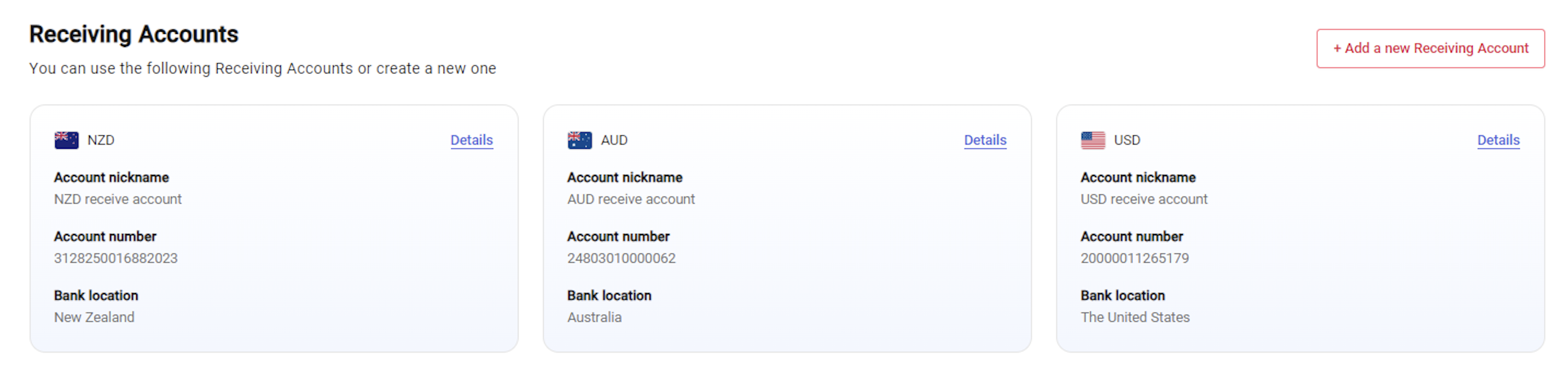
You need to set up a Receiving Account in the corresponding currency of your Amazon marketplace. For instance, if you sell on Amazon US from Australia, you must open a US currency account on WorldFirst to accept USD payments.
a. On your World Account dashboard, go to the Collection tab.
b. Click Manage Accounts > Add a New Receiving Account.
c. Select the currency of your marketplace.
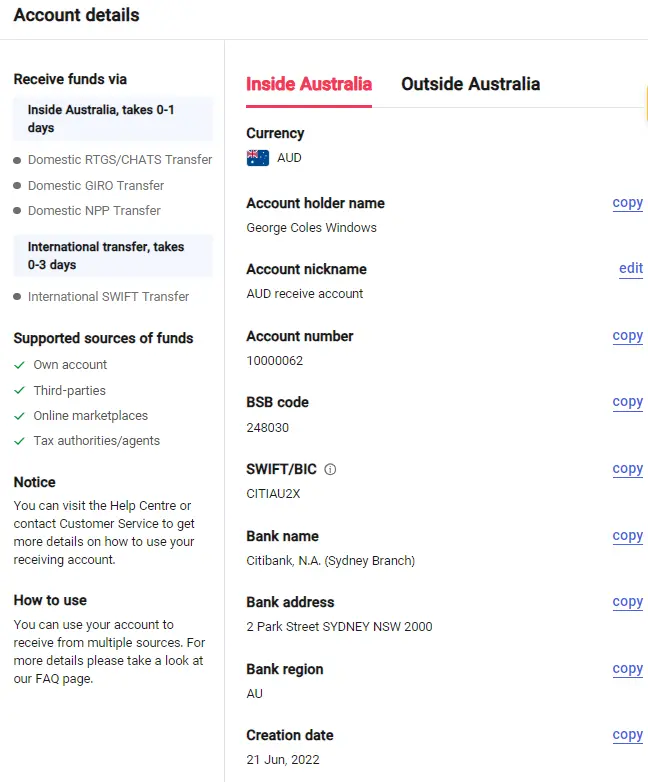
Once the account is set up, you can click on details to get the account details which includes bank account number and a sort code.
You don’t need a local banking address to open local currency accounts with WorldFirst.
3. Enter your bank details on Amazon
Follow the steps below to add your WorldFirst bank details on Amazon
1. Go to Amazon Seller Central > Settings > Account info
2. Under the Payment Information tab, select Deposit Methods
3. Click Add New Deposit method
4. Choose the store to which you want to add the deposit method to
5. Use the drop-down list to select the bank location country. This is the country of your Receiving Account with WorldFirst. You can set up accounts of different currencies based on your Amazon store location. For example, a US account for Amazon US and a UK account for Amazon UK.
6. Copy and paste the account details from your WorldFirst Receiving Account. The banking information required will depend on the location.
- Amazon Australia: Add account number, name of the account holder, and BSB code
- Amazon US: Add the account number along with the routing number
- Amazon UK: Add the bank account number and sort code
- Amazon Europe: Add the IBN and BIC
For more details, please check here
4. Verify your bank account
Your bank account must be verified before you start receiving deposits from Amazon. You can follow the steps below to initiate verification. Amazon will notify you within 48 to 72 hours if your bank account has been verified or to inform you of any additional steps required.
- Go to Amazon Seller Central > Settings > Account info
- Under the Payment Information tab, select Deposit Methods
- Go to Manage Deposit Methods and find the bank account you have just added
- On the Verify Bank Account page, select Bank Account Holder Name.
- Click Upload Bank Statement to upload your bank document. (WorldFirst can provide you with this document)
- Confirm the requirements for verification, and then click Submit for Verification.
- You’ll be redirected to the Manage Deposit Method page, where your bank account verification status will display ‘In progress.’
Once the verification is complete, you can receive earnings from Amazon with the World Account.
For more details, check here
5. Get paid with WorldFirst
After receiving Amazon earnings in your World Account, you can convert it to any other available currency or hold the funds for now. There is no limit to how much funds you can receive in different currency accounts.
Disclaimer: The information contained is general only and largely our views. Before acting on the information you should consider whether it is appropriate for you, in light of your objectives, financial situation or needs. Although information has been obtained from and is based upon multiple sources the author believes to be reliable, we do not guarantee its accuracy and it may be incomplete or condensed. All opinions, estimates, mentioned products/services and referenced material constitute the author’s own judgement as of the date of the briefing and are subject to change without notice. WorldFirst shall not be responsible for any losses or damages arising from your reliance of such information.




![How to set up your AliExpress dropshipping business in Australia [2026]](https://mdn.marmot-cloud.com/worldfirst/sites/8/2026/10/20261001222121715-300x200.webp)