




























Learn how to sell physical and digital products on Etsy Australia while reaching a global audience
Key takeaways
- Etsy is a unique marketplace for selling handmade, vintage, or personalised products, both physical and digital
- Etsy prohibits mass-produced or generic products
- Popular categories on Etsy include home décor, clothing, jewellery, toys, and collectibles, catering to a wide range of creative products
- Customising your Etsy storefront with a professional look can help your business stand out and attract more buyers
- Australian sellers can collect Etsy payouts in multiple currencies through a World Account, with local receiving details in 20+ currencies
- The World Card lets you spend directly from your World Account balances for Etsy fees, ad spend and other seller expenses

Etsy has a unique positioning in the sea of marketplaces. It allows you to sell handmade, vintage, and one-of-a-kind products. While physical products are popular on Etsy, you can also sell digital products like art, sewing patterns, fonts, and planners.
The majority of Etsy users identify as women, making it a great marketplace to sell products if women are your primary target audience.
In 2023, Etsy’s revenue was $2.74 billion, a 7% year-on-year increase. As of 2023, the marketplace had 96 million active buyers and 8.3 million sellers.
If you’re planning to list your products on Etsy, don’t miss our complete guide—it’s packed with actionable tips and insights to help you stand out and succeed on the competitive marketplace.
What is Etsy?
Etsy is an online marketplace where business owners, artists, and individuals can sell their products. It’s different from the other marketplaces because it is home to millions of unique, vintage, and craft supply products.
Etsy acquired music equipment marketplace Reverb in 2019 and clothing reseller Depop in 2021. The acquisitions made by Etsy directly mirror the company’s vested interest in the vintage community.
You can sell handmade items (whether physical or digital) or curate goods. Etsy doesn’t have a warehouse where you can send and store your goods. As an Etsy seller, you have to manage your orders, inventory, and shipping yourself.
What can you sell on Etsy Australia?
The first thing you should know about selling on Etsy is that the usual mass-produced items are not allowed. However, you can sell items that are sourced or handpicked.
If you plan to sell sourced products, they should enable the buyer’s creativity in some way. So, you can source products like party decorations, craft suppliers, or even personalised products. Before you list products on Etsy, make sure to review the platform’s Creativity Standards Policy.
Some of the popular product categories on Etsy include:
- Home decor
- Clothing
- Jewellery and accessories
- Toys
- Collectibles
Here are the products that are prohibited on Etsy (make sure to recheck Etsy’s official list for the updated information):
- Dangerous or hazardous products
- Recalled items
- Alcohol, drugs, tobacco, or medical devices
- Weapons
- Internationally regulated products
- Animal products
Selling on Etsy Australia in 5 simple steps
Here are the steps to open your Etsy store and start selling on the marketplace:
1. Register for an Etsy seller account
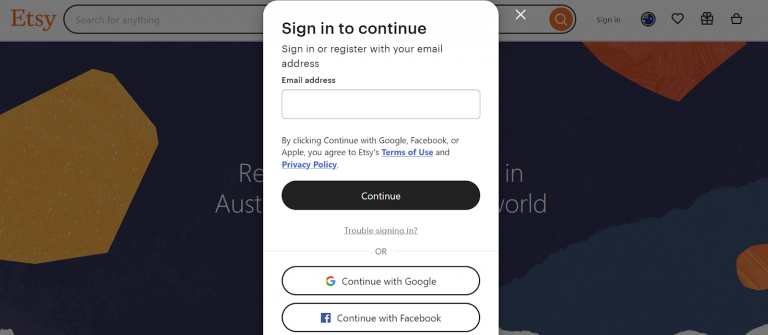
The first step is to create an Etsy account, if you haven’t already. Visit the Etsy Australia page and click the ‘Get started’ button. You’ll have to register with your email address and details about yourself and your business.
2. Build and customise your Etsy storefront
While you can list products directly without customising your storefront, building a fully customised storefront with your business branding helps you stand out from the competition.
Your potential customers may visit the storefront before deciding to make a purchase. They may also be interested in the products you offer.
To customise your shop homepage, go to your seller dashboard → open Shop Manager → Info and appearance.
Here are some ways you can customise your Etsy storefront:
- Add your profile picture, business logo, store banner, and shop icons
- Introduce yourself as the shop manager in the About section. Adding a personal touch helps customers connect with you better
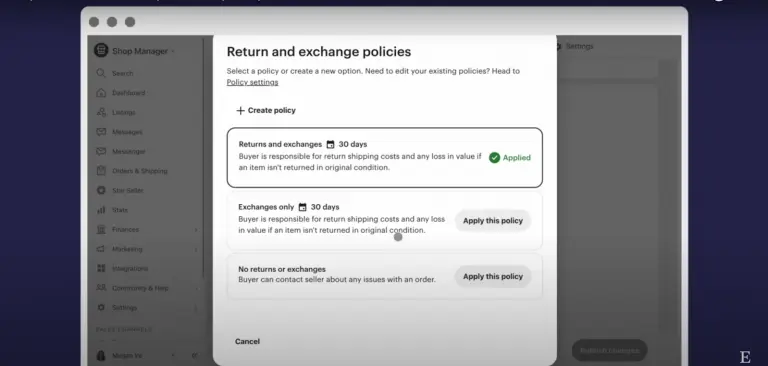
- Add details about your shop policies, including returns, payments, and more
- Share shop announcements if you’re running a sale or might have delayed shipments
3. Create your product listing
The next and most important step is to create your first product listing.
To add a new product, go to Shop Manager → Listings → Add a new listing.
You’ll have to add all the details about your product, including:
- Product title: Keep the title within 140 characters and try to include keywords so it is easy for potential customers to find the product when they search for a related keyword
- Photos and videos: You can add up to 10 pictures and 1 video
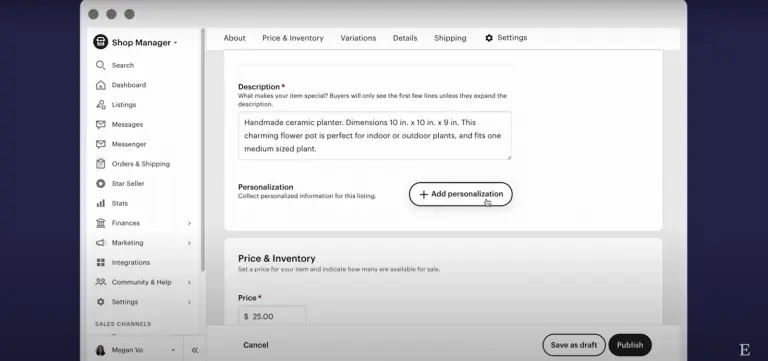
- Description: Add details about your products so your customers know exactly what they will be getting
- Personalisation: In case the product can be personalised, add instructions for the same
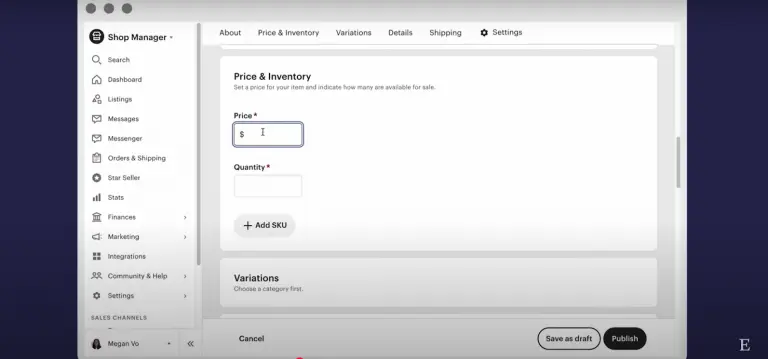
- Quantity and variations: Add the available product quantities and details of different product variations (if unavailable)
- Price: Add the pricing in your preferred currency. Your customers may see the prices in their supported currencies. For instance, if your shop currency is AUD, but your customers are based in the UK, they may see the product pricing in GBP when browsing Etsy
When customers search on Etsy, the product title, images, and price are the key factors that determine if they’ll click on your listing in the search results.
Etsy is a marketplace where customers seek visually aesthetic products, so getting your listing images right is very important. The first photo should be eye-catching and encourage customers to look closer at the product.
The photos should be high resolution, well-lit, and at least 2000px for the shortest side of the image with a 72PPI. Etsy recommends not using collages for the first product image as it can confuse customers. Your images should also not have any placeholder text on them.
Etsy is built on a search engine that connects customers with sellers, so you must get your SEO right to increase listing visibility.
Take a look at our complete guide on Etsy SEO
4. Add shipping information
You’ll also have to add shipping details to your product listing to give customers a clear idea about shipping costs and timelines. You can use shipping/ delivery profiles to add the same shipping information to multiple listings.
To create delivery profiles, go to Shop Manager → Settings → Delivery settings → Create profile. Now, you can add shipping details, including fixed or variable shipping rates based on location and product weight. Give a name to your delivery profile and save it.
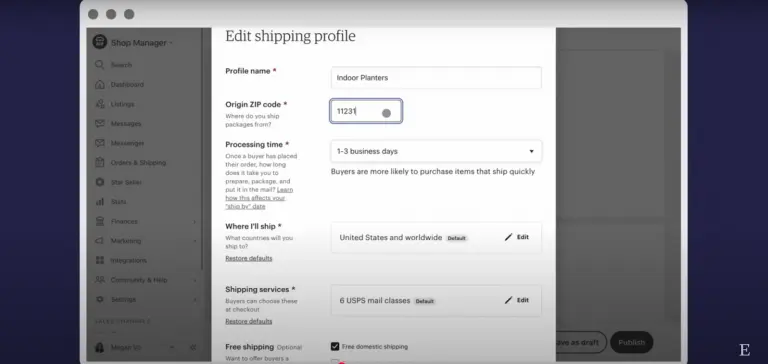
Once you have saved the delivery profile, you can apply it to different delivery product listings. Here are the steps to add a delivery profile to a product listing.
- Go to Shop Manager → Listings
- Select the checkbox of all the listings that should have the same delivery profile
- Go to ‘Editing options’
- Select ‘Change delivery profiles’ from the dropdown menu
- Select the profile and click on Apply
Etsy offers global shipping labels for US-based sellers, allowing them to generate and download shipping labels directly. But if you’re based in Australia, then you’re on your own. You’ll have to manage the entire shipping process end to end and share the tracking information with the customers.
5. Add your bank account details to get paid
Etsy Payments is the main way to get paid for all your sales on Etsy. When you open your shop on Etsy, you can enrol for Etsy Payments at the same time.
Enrolling for Etsy payments allows you to support various payment options on your Etsy store, including:
- Credit/ debit cards
- Etsy gift cards or credits
- PayPal
- Google Pay
- Apple Pay
- Klarna
When you get a new order on Etsy, the funds are first deposited into your Etsy Payment account. You can then withdraw the funds according to the deposit schedule and the daily deposit minimum threshold amount.
For Australia, the deposit minimum is AUD 25. That means to withdraw funds into your bank account, you’ll at least need to have AUD 25 in your Etsy account.
You need a valid bank account connected to your Etsy account to receive payments. Whenever you update or change your bank account details, there will be a 5-day holding period, after which you can continue withdrawing funds.
Before you can accept or withdraw any funds from Etsy, the platform will take steps to verify your identity and bank account. When you register as a business on Etsy, you’ll have to provide information like:
- Entity name (as specified on your government-issued business verification document)
- Legal business address
- Business identification number
- Details of Any Ultimate Beneficial Owners (UBOs) of your shop who own at least 25% of your business’ capital
Etsy may ask for additional information, too and if you cannot provide it within the speculated timeframe, your account may be blocked until the verification process is complete.
How much does it cost to sell on Etsy?
Etsy may charge you a one-time shop setup fee when you open your Etsy storefront. But, Etsy doesn’t state the exact fee that may be charged or who is required to pay this fee. You’ll only be able to find this out when you complete your Etsy store’s final setup.
| Fee type | Amount/Percentage | Details |
| Listing fee | AUD 0.30 (or USD 0.20, converted to account currency) | Charged for every product listed. Listing remains live for 4 months or until the product sells out |
| Transaction fee | 6.50% | Charged on every sale made |
| Payment processing fee | AUD 0.25 | Charged per transaction |
| Currency conversion fee | 2.50% | This applies if your shop listing currency differs from your connected bank account’s currency. The currency conversion rate includes a markup |
For instance, if you’re using an AUD bank account and listing products in USD to attract US-based customers, then the total fee levied on every sale will include
- 2.5% currency conversion fee
- 6.5% transaction fee
- AUD 0.25 payment processing fee
- Current currency conversion rate
Fast, reliable, and secure Etsy payment collections with WorldFirst
Etsy’s buyer base spans the US, UK, Canada, Europe and Australia. For Australian sellers, each of those markets can mean a different currency landing in your account, usually converted to AUD at the bank’s rate on arrival unless you have the right receiving setup in place.
The World Account from WorldFirst is a multi-currency business account built for cross-border sellers. It gives Australian Etsy sellers a way to collect international payouts in the matching currency and hold the balance until you decide to convert.
Key features of the World Account for Australian Etsy sellers:
- Local receiving account details in 20+ currencies, including USD, GBP, EUR, CAD, NZD, SGD, HKD, JPY, AUD and CNH, with each currency carrying its own account number
- Collect payouts from 130+ marketplaces and payment gateways, including Etsy, Amazon, Shopify, eBay, Lazada and Stripe
- Spend with the World Card, a Mastercard-powered multi-currency card linked to your World Account. Australian Etsy sellers can issue up to 20 World Cards at no additional cost and use them to pay for Etsy listing fees, Etsy Ads spend, Meta and Google ad campaigns, Canva and Adobe. Cashback is available on eligible business spending (Terms and Conditions apply), which can help offset Etsy fees over time
- Send international payments in 100+ currencies across 200+ countries and regions for suppliers, contractors and overseas services
- Lock in exchange rates for upcoming conversions with forward contracts, protecting margin from FX movement (subject to eligibility)
- Free and instant transfers between World Account holders
- Xero and NetSuite integrations for automated reconciliation across currency balances
- Zero account opening fees, zero monthly fees and zero fees on receiving funds
How to collect Etsy payments with a World Account
If you are a seller on Etsy, you can withdraw your marketplace payouts into your World Account. From there, you can hold funds in multiple currencies, convert at competitive rates between your currency balances, withdraw to your bank account, or pay overseas suppliers directly.
Here is how to set it up in two steps. The example below uses a USD receiving account. The same steps apply for other currencies.
Step 1: Set up a receiving account in your World Account
- Log in to the World Account dashboard
- Go to the Collections tab and click Manage accounts
- Click Add a new Receiving Account
- Select the currency for your receiving account (USD, GBP, EUR, CAD and others are supported)
- Choose the account usage, marketplace platform (Etsy), supported bank, and enter an account name
- Click Confirm to complete the receiving account setup
- Once the account is active, click Details to view the account number, routing number and other information you will need to link it to Etsy
Step 2: Link your World Account to Etsy
Before linking, make sure your World Account receiving account is already created in the matching currency (for example, a USD receiving account if you want to collect USD-denominated Etsy payouts).
- Log in to your Etsy seller dashboard
- From the left-hand menu, go to Finances → Payment settings
- On the Payment Settings page, click Payment Methods to add a receiving account. If one is already linked, click Edit to modify it
- Etsy will redirect you to a third-party verification page. Click Continue, select Manual to add the account manually, then click Continue again
- Enter the account details exactly as shown in your World Account receiving account:
- Routing number: the ACH routing number from your World Account
- Account number: the account number from your World Account
- Confirm account: re-enter the account number
- Account type: Checking
- Click Authorize to let Etsy send a micro-deposit for verification
- Once the account passes verification and shows Verified, your World Account is linked to Etsy and ready to receive payouts
From here, every Etsy payout settles directly into your World Account in the matching currency. You can hold the balance in USD, convert to AUD when the rate suits, use the balance to pay suppliers or ad platforms, or move it to your Australian bank account at any time.
Disclaimer: The information contained is general only and largely our views. Before acting on the information you should consider whether it is appropriate for you, in light of your objectives, financial situation or needs. Although information has been obtained from and is based upon multiple sources the author believes to be reliable, we do not guarantee its accuracy and it may be incomplete or condensed. All opinions, estimates, mentioned products/services and referenced material constitute the author’s own judgement as of the date of the briefing and are subject to change without notice. WorldFirst shall not be responsible for any losses or damages arising from your reliance of such information.