Knowing how to close a business bank account starts long before you submit the closure form. A customer can still send money to the old account, an HMRC Direct Debit can fail, or payroll can draw from an account that’s about to close.
In Q3 2025, 10,393 small business and charity accounts moved through the Current Account Switch Service (CASS), up 43% from the previous quarter and the highest quarterly total since Q2 2021.
This guide explains how to close a business bank account, choose between CASS and a manual switch and move essential payments before access to the old account ends.
Key takeaways:
- Close the account only after every dependency has moved: Customer receipts, Direct Debits, payroll, cards, user access and connected software can all fail if the old account closes too early
- Choose the right closure route first: Use direct closure for an unused account, CASS for an eligible full switch or a manual switch when you need both accounts open during the transition
- Check linked products and outstanding balances: Overdrafts, credit cards, loans, foreign currency accounts and merchant services may follow separate terms and won’t always close with the current account
- Test the replacement before moving live payments: Confirm that incoming and outgoing payments, approval controls, accounting feeds and statement exports work before relying on the new account
- Keep domestic and international payments separate where needed: A World Account can work alongside your UK current account to support eligible foreign currency receipts, conversions and overseas supplier payments
Open a World Account to give your international payment flows a dedicated route before closing your old account.
What does closing a business bank account involve?
Closing a business bank account ends the account agreement between the provider and the business. Once the closure takes effect, the account can no longer receive payments, send money or support connected cards and user access.
The effect depends on the scope of the closure:
- One account: A secondary, savings or foreign currency account may close while the main current account remains active
- The main current account: Regular payments, user permissions and connected systems may all rely on its details
- Every account with the provider: Savings accounts, foreign currency accounts, cards, merchant services and finance agreements may follow separate closure rules
The provider can transfer any remaining credit balance to another account, but an overdraft or unpaid charge remains payable. Debit cards stop working, online access ends and linked users lose permission to view or approve transactions.
A direct closure ends the account without transferring its payment arrangements. A full CASS switch moves the remaining balance and eligible payment arrangements before the old account closes.
Should you close or switch your business bank account?
Close an unused account directly, but switch a main account when the business still relies on its payment arrangements.
1. Close an account that no longer has a role
A direct closure suits an unused secondary, savings or currency account with no remaining balance, active payments or linked services.
2. Switch a main account that no longer fits
Switching makes more sense when the business will continue trading, but the account creates unnecessary cost or friction.
Research published by the Current Account Switch Service found that 73% of UK SMEs would consider switching for a more suitable account. Accounting software integration mattered to 65%, while 54% valued mobile banking.
Common reasons to switch include:
- Higher total costs: Transaction, cash-handling, international transfer and FX charges outweigh the account’s value
- Limited controls: User roles, approval rules or payment limits no longer match the finance process
- Poor software connections: Accounting, payroll or expense systems require repeated manual work
- Restricted payment options: The account lacks the currencies, destinations or payment types the business uses
- Unreliable service: Payment delays, blocked transactions or limited support affect important payment runs
3. Keep the account when only one payment flow needs to change
Keeping the main account can make sense when the account supports:
- Domestic banking needs
- An overdraft or finance agreement that won’t transfer
- Established customer payment instructions
- Cash deposits
- A service the replacement doesn’t provide
How to close a business bank account: step-by-step guide
Start with the closure route because it determines what moves automatically and what your business must update itself.
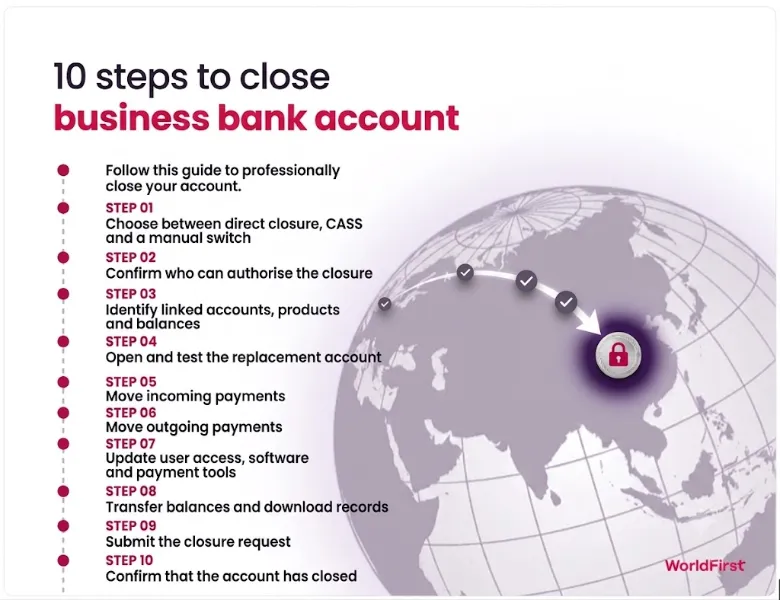
Step 1: Choose between direct closure, CASS and a manual switch
A direct closure suits an account with no active payment arrangements to move. Once the balance, linked products, and required records have been addressed, the account follows the provider’s closure process.
A full CASS switch transfers the remaining balance and eligible payment arrangements to the new account. The old provider closes the previous account on the agreed switch date.
With a manual switch, your business updates each payment instruction, transfers the balance and chooses when to close the old account. Both accounts can remain open while you test the new setup.
A manual switch suits businesses outside CASS or those that need to keep both accounts open during the transition.
Step 2: Confirm who can authorise the closure
The account mandate determines who can approve the closure.
Check the person authorised to submit the request, the number of required approvals and any board resolution requirement. Confirm that the provider holds current contact details.
Give each required user the correct access to the replacement account.
Step 3: Identify linked accounts, products and balances
Closing the current account won’t automatically end every linked product, so create one record covering:
- Accounts and balances: Savings, deposits and foreign currency accounts
- Cards and finance: Debit cards, credit cards, overdrafts and loans
- Payment services: Merchant services, employee cards and third-party permissions
- Pending activity: Card payments, refunds and chargebacks
Record the balance, status and closure requirements for each item. Include any notice periods, repayment terms or separate forms.
You can use CASS while the account is overdrawn, but the replacement provider must approve any new overdraft. Without that agreement, you’ll need to repay the old provider separately.
Step 4: Open and test the replacement account
Complete the replacement account application before sending a closure instruction to the old provider.
Once the new account opens:
- Add the required users and set their approval limits
- Activate the cards the business needs
- Test incoming and outgoing payments, then check that their references appear correctly
- Connect the accounting software and check statement exports
- Confirm any replacement overdraft
For CASS, the replacement account must be open before you choose the switch date. The date must fall at least seven working days later and can’t fall on a weekend or bank holiday.
Read more: 10 best business bank accounts for startups in the UK
Step 5: Move incoming payments
List every customer, platform and organisation that sends money to the old account.
Update:
- Customer receipts: Invoice templates, recurring customers and payment portals
- Platform revenue: Marketplaces, payment gateways and card processors
- Refunds and repayments: HMRC, insurers, suppliers and rebate providers
- Documents: Contracts and other records containing bank details
CASS redirects incoming payments sent to the old account after the switch. A manual switch provides no automatic redirection, so each payer needs the new details before closure.
Confirm high-value changes through a trusted channel. Ask customers to use an existing contact or verified phone number rather than relying on an email.
Step 6: Move outgoing payments
Check at least 12 months of transactions to capture monthly, quarterly and annual commitments.
Update the account details or instructions for:
- Payroll and pension payments
- VAT, PAYE and Corporation Tax arrangements
- Supplier payments
- Direct Debits and standing orders
- Rent, insurance and utility payments
- Loan and business credit card repayments
- Debit-card subscriptions
CASS transfers eligible Direct Debits and standing orders. It doesn’t automatically update debit card details stored with software providers, subscription services or other merchants.
Payment instructions created at the old provider during the final seven working days may not transfer automatically. Set them up on the replacement account instead.
Step 7: Update user access, software and payment tools
Reconnect the accounting feed, payroll software, expense platform and reporting tools. Rebuild saved beneficiaries, payment templates and approval workflows, then renew Open Banking permissions and assign the correct employee access.
Remove outdated access and confirm that the correct users can prepare, approve and view payments through the replacement account.
Reconcile both accounts after reconnecting the accounting platform. The final transactions from the old account and the first transactions from the new one should appear in the correct reporting period.
Step 8: Transfer balances and download records
Wait for pending transactions before moving the full balance. Card payments, fees, interest and refunds may still change the available amount.
Before closure:
- Leave enough money for pending payments, fees and refunds
- Settle or arrange repayment of the overdraft
- Transfer the remaining GBP and foreign currency balances
- Download statements, transaction exports and supporting payment documents while online access remains active
- Record the account details and closure date
UK limited companies generally need to keep accounting records for six years from the end of the financial year they cover. If the account belongs to a sole trader, records generally need to be retained for at least five years after the relevant 31 January filing deadline. Longer periods may apply.
Step 9: Submit the closure request
The available route depends on the provider, account type and mandate.
The provider will usually ask for the business and account details, authorised signatures, proposed closure date and destination for the remaining balance. It may also request confirmation that outstanding charges have been settled and that cards or cheque books will no longer be used. Save a copy of the request and its reference number.
During a full CASS switch, don’t send a separate closure request unless the new provider instructs you to do so.
Step 10: Confirm that the account has closed
A submitted request doesn’t prove that the provider has completed the closure:
- Confirm that the final balance reached the replacement account
- Save the final statement and written closure confirmation
- Confirm that the provider cancelled the cards and ended online access
- Check the final statement for unexpected charges
- Verify the first important incoming and outgoing payments
- Store the completed migration record with the accounting documents
Read more:
- How to open a business bank account in Turkey from the UK
- How to open a bank account in Poland as a non-resident
- How to open a business bank account in Dubai
Common problems when closing a business bank account
Typical issues include unsettled transactions, missing approvals and linked products that follow separate closure terms.
| Problem | What to check |
| Outstanding overdraft | Confirm the settlement amount and check if the provider requires full repayment before closure |
| Pending card payment | Leave enough money available until the transaction settles |
| Refund due to an old card | Ask the bank or card provider how it will route the refund after closure |
| Missing approval | Check the account mandate, required signatories and any board resolution |
| Customer pays the old account | Check if CASS redirected the payment |
| Failed Direct Debit | Contact the new provider if the failure occurred during a CASS switch |
| Statements weren’t downloaded | Request historical statements or a transaction export from the former provider |
| Linked loan or card remains open | Check the separate product terms, repayment method and closure process |
Keep international payments moving after the switch with WorldFirst
Closing a business account can disrupt international payment routes that don’t move through CASS. WorldFirst can provide a new route for overseas customer receipts, marketplace payouts and supplier payments through a multi-currency account, reducing reliance on the old account details.
Consider a UK importer that receives recurring USD payments and settles regular supplier invoices in CNH (offshore renminbi). If the USD enters an account that only holds GBP, the provider may convert it automatically under its account terms. Paying the supplier later could then require a second conversion from GBP into CNH.
The replacement UK current account can handle payroll, tax and other domestic commitments. Through the World Account, WorldFirst can support the international flows, giving the business a multi-currency account for receiving and holding supported currencies, converting funds when needed and paying overseas suppliers.
You can receive and hold funds in 20+ currencies and make payments in 100+ currencies to 200+ countries. Availability depends on the business, currency and payment route.
Before closing the old account, update the USD receiving details, verify the CNH supplier beneficiary and test both payment routes.
WorldFirst isn’t a bank. World First UK Limited is a UK-registered limited company with company number 05022388 and is authorised by the Financial Conduct Authority (‘FCA’) as an Electronic Money Institution under the Electronic Money Regulations 2011 with FCA Firm Reference number 900508.
Open a World Account to receive supported currencies and pay overseas suppliers alongside your UK business current account.
FAQs
1. Can I close a business bank account online?
In many cases, yes. The available route depends on the provider, account type and signing mandate. Some providers accept an online or in-app request, while others require a signed form, postal instruction or branch visit.
2. How long does it take to close a business bank account?
A full CASS switch takes seven working days. Direct closures and manual switches follow the provider’s own time frame, which may depend on outstanding transactions, required approvals and linked products.
3. Can I close a business account with money still in it?
Usually, yes, if the balance is in credit. The provider can transfer the remaining funds to another account, but pending payments, unpaid fees or an overdraft may need to be settled first.
4. Can closing a business bank account affect business credit?
Not usually by itself. Unpaid overdrafts, missed repayments, defaults or other adverse information linked to the account can affect the business’s credit profile, so settle outstanding borrowing before closure.
5. Can I reopen a business bank account after closing it?
Don’t assume that you can. Some providers won’t reverse a completed closure, while others may require a new application and fresh eligibility checks. Check the provider’s policy before submitting the request.
Sources:
- https://www.currentaccountswitch.co.uk/news-insights/latest-news/the-current-account-switch-service-records-surge-in-sme-switches/
- https://www.currentaccountswitch.co.uk/news-insights/latest-news/current-account-switch-service-unveils-sme-and-charity-switching-trends/
- https://www.currentaccountswitch.co.uk/media/sb5j20mc/cass-dashboard-q1-2026.pdf
- https://www.gov.uk/running-a-limited-company/company-and-accounting-records