




















Multi-currency accounts, competitive FX, and global transfers — Everything you need to pay and get paid internationally

WorldFirst Enterprise
Built for faster payments, smarter liquidity, and robust compliance—all powered by our next-gen API toolkit and AI-native architecture.

Named a Top Global Fintech Company by CNBC & Statista, we’ve supported 1.5M+ businesses since 2004.

Europe
Asia
Oceania
Africa

We provide coverage in South Asia and Middle East: servicing 210+ countries and territories.

Westpac business foreign currency account review and comparison

Contents

Take a look at the features and fees of the Westpac foreign currency account for businesses in this detailed review.

Key takeaways

  • You can set up 12 foreign currency accounts with Westpac
  • Sending international payments requires a linked Westpac AUD transaction account
  • Overdraft facilities are available but subject to Westpac’s lending criteria
  • A deposit maintenance fee applies on certain currencies


Introduction

A Westpac foreign currency account is designed for businesses that make regular international transactions. The multi-currency account supports 12 local currencies.

But is this the best business bank account for you?

In this detailed review, we look at the features and fees of the Westpac foreign currency account so that you can choose the best business bank account. We also compare Westpac to WorldFirst so you can choose the best account for your global business.

What is the Westpac foreign currency account?

Westpac offers foreign currency accounts for making and receiving payments. You can also hold international balances and convert them into AUD when the exchange rates are favourable.

Westpac is one of Australia’s oldest banks, headquartered in Sydney. It provides various financial services to individuals and businesses, including banking, loans, insurance and credit cards.

You can manage Westpac foreign currency accounts online or at a branch. You can’t get an ATM card or withdraw foreign cash through this account.

Key features of Westpac’s multi-currency account

With Westpac, you can set up 12 foreign currency accounts including USD, EUR, SGD, JPY, CAD and NZD. Three more currencies are available (SEK, CHF, and THB), but they can only be opened by visiting a Westpac branch [1].

You can manage the multi-currency account online – from signing up and receiving payments to handling different currencies.

However, to send payments, you need a Westpac AUD transaction account. Fees for foreign transactions are taken from this AUD account.

Overdrafts are available but need to meet Westpac’s lending criteria. Charges apply for both arranged and unarranged overdrafts.

Westpac mentions you can earn interest on positive balances, but currently, all listed currencies have 0% interest*.

*As checked in May 2024

Quick look: Pros and cons of Westpac

Pros Cons
  • Set up multi-currency account in 15 currencies (12 can be opened online)
  • Overdraft facilities available
    No monthly account keeping fees
  • Sending international payments requires a linked Westpac AUD transaction account
  • If you’re not a Westpac customer, you can only apply for a foreign currency account at a Westpac branch or through a Westpac representative [2]

Westpac foreign currency account fees: The breakdown

Westpac Foreign Currency account fees [2]
Monthly fee Free
Multi-currency account Free (You need a linked Westpac AUD transaction account)
Receiving funds AUD 12 for every payment
Holding funds in multiple currencies A deposit maintenance fee may apply, depending on the currency and amount
Sending payments to other accounts
  • Foreign currency transfer via Westpac Online Banking except Corporate Online: $0
  • Foreign currency transfer via Corporate Online: $20
  • Foreign currency transfer in AUD via Westpac Online Banking: $20
  • Foreign currency transfers in AUD or foreign currency via branch: $32

    Note: Fees are in USD, which will be converted into AUD and deducted from your AUD account

*Fees checked in May 2024

Note: There are no monthly fees for setting up and using a foreign currency account with Westpac. But to send international payments, you’ll need a Westpac AUD transaction account, which might have its own monthly or annual fees.

Who can open a Westpac business foreign currency account?

For businesses wanting to open a Westpac foreign currency account, you’ll need to prove the following [1]:

  • Be 18 years of age or older
  • Be an Australia-based business
  • Be a sole trader, company director, or other individual authorised to open an account on behalf of the business
  • Have a Westpac AUD transaction account to send money and pay fees on foreign transactions

How to open a Westpac foreign currency account

If you already have a Westpac AUD transaction account, you can apply for a foreign currency account online. Without one, you’ll have to visit a Westpac branch to request a new account.

Here are the details you’ll need to set up a foreign currency account [1]:

  • Customer ID, if you already have a Westpac AUD account

Business registration details, including name, address, and industry

  • Details about the sole trader, owners,directors and partners of the business
  • Details of all the people who will operate the account
  • Foreign tax residency information
  • Your ACN (if applicable) and ABN in case the company is regulated

Westpac states that it may perform a company search to verify all the company-related information. A fee will be charged for this service [2].

Westpac alternative: WorldFirst

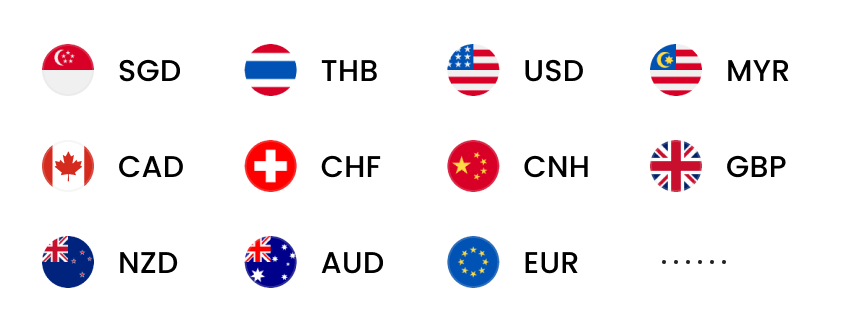
WorldFirst allows businesses to send, receive, and hold funds in 15+ currencies, including GBP, USD, CAD, EUR, AUD, NZD and CNH.

With a World Account, you can:

Send and receive payments like a local: Set up local currency accounts in your business name with unique account details, without needing an overseas address.

Make international payments: Pay suppliers, staff and business partners in 90+ currencies across 130+ countries and regions.

Integrate with global marketplaces: Collect payments from 100+ marketplaces and payment gateways, including Amazon, eBay, AliExpress and Stripe.

If you’re still unsure about WorldFirst vs Westpac, check out our comparison of fees.

Westpac foreign currency account fees WorldFirst
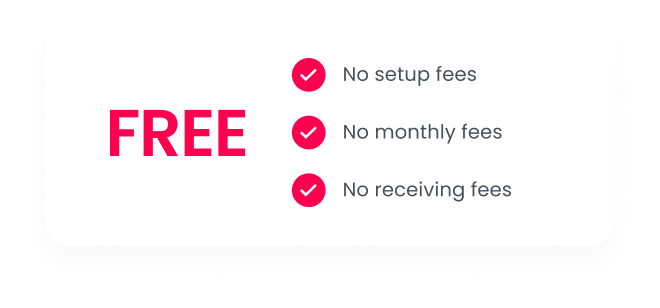
Monthly fee Free Free
Opening a multi-currency account Free (but you need a linked Westpac AUD transaction account) Free
Receiving funds AUD 12 for every received payment Free
Holding funds multiple currencies For wholesale clients, a deposit maintenance fee may apply on certain currencies and amounts Free
Sending payments to other accounts** Foreign currency transfer via Westpac Online Banking except Corporate Online: $0

  • Foreign currency transfer via Corporate Online: $20
  • Foreign currency transfer in AUD via Westpac Online Banking: $20
  • Foreign currency transfers in AUD or foreign currency via branchr: $32

    **Fees are in USD and can be paid in USD or AUD.

[Fixed transaction fee] + up to 0.6% currency conversion fee (up to 0.8% for 1688 payments)
Sending payments to users in the same network As above Free and instant
Currency conversion fees still apply in case of cross-currency transfers

Sources:

  1. https://www.westpac.com.au/business-banking/bank-accounts/foreign-currency-account/
  2. https://www.westpac.com.au/content/dam/public/wbc/documents/pdf/cb/foreigncurrencyaccount.pdf

Disclaimer: The information contained is general only and largely our views.  Before acting on the information you should consider whether it is appropriate for you, in light of your objectives, financial situation or needs. Although information has been obtained from and is based upon multiple sources the author believes to be reliable, we do not guarantee its accuracy and it may be incomplete or condensed. All opinions, estimates, mentioned products/services and referenced material constitute the author’s own judgement as of the date of the briefing and are subject to change without notice. WorldFirst shall not be responsible for any losses or damages arising from your reliance of such information.

Based in Sydney, Jim is responsible for the WorldFirst business across Australia and New Zealand. He brings with him over 25 years of experience helping Business Owners, CFO’s and Treasury Managers overcome the challenges with cross border payments and navigating volatile foreign exchange markets.

Jim Vrondas

Author

Country Manager ANZ at WorldFirst

Continue reading

The simpler way to pay and get paid

Save money, time, and have peace of mind when expanding your global business.