If you’re looking to sell online in Australia and New Zealand, you may be wondering:
- What online marketplaces should you sell on in Australasia?
- How should you plan your expansion into the Australian and New Zealand markets?
- How do you import into Australia and New Zealand as an international seller?
- How do you manage payments in local currency when selling in different countries?
In this guide, we share what you need to know about selling online in the region.
We’ll also introduce you to what we do at WorldFirst to help make your cross-border payments simpler and more secure. Want to receive profits in AUD, NZD, GBP and 20 other currencies? Open a World Account today.
What online marketplaces should you sell on in Australasia?
If you want to sell in Australia and particularly New Zealand, you need to reckon with one of the peculiar features of the region’s e-commerce landscape. In this part of the world, Amazon isn’t the dominant player that it is elsewhere.
Since 2017, the global e-commerce giant has had a presence in Australia, and now has fulfilment centres in Sydney, Melbourne, Brisbane, Perth, Canberra and Adelaide. Yet its footprint in New Zealand is much more limited. It doesn’t have a New Zealand-specific website at all, instead requiring Kiwis to order internationally from Australia.
So, what marketplaces are popular in Australia and New Zealand instead? Here are some of the best options for e-commerce websites to sell your products.
- Trade Me. Founded in 1999, Trade Me is New Zealand’s largest online marketplace. It began allowing international sellers access in 2013. According to Ahrefs, it’s one of the top 10 most visited sites in the country – and the most visited shopping site – giving you a large potential customer base.
To sell on Trade Me NZ as an international seller, you’ll need to fill in this Google Form. If you make more than £500,000 in online sales every year and you’re prepared to ship products from the UK to New Zealand, you’ll likely be accepted as a seller.
- Kogan. Kogan was born as a television and electronics marketplace, but today, sellers can list products in 19 product categories. While there are larger platforms out there, Kogan has the benefit of being focused on the Australian and New Zealand markets.
To leverage Kogan, you can choose to either sign up as a supplier or sell on the Kogan marketplace yourself. You’ll need to complete this form to be considered as a marketplace seller.
- Bunnings. Bunnings is another popular marketplace in Australia and New Zealand, focusing on home and gardenware. It previously only sold its own products, but in 2019 it launched MarketLink, which allows third-party sellers to sell through the platform in the region.
As with the other marketplaces listed above, you’ll need to complete this form to sell on Bunnings.
- Etsy. Another popular marketplace in Australia and New Zealand is Etsy, the global platform for unique gifts, vintage products and crafts. In fact, Australia alone is Etsy’s fifth largest traffic source.
It’s easy to get set up on Etsy. Find out more about how to make your online store a success here: How do I get my Etsy listing on the first page?
- Amazon Australia. While Amazon isn’t the dominant force that it is in other countries, it remains a valuable channel through which to sell – particularly in Australia. In 2021, Amazon Australia began sending products to consumers in New Zealand, which reduced shipping costs for customers in that country.
If you have an existing Amazon Seller Central account, you can use it to sell products on any of Amazon’s North American, European and Asian accounts. To get started, register your Seller Central account with an Amazon Marketplace, and then set up your global selling account. Finally, use the Build International Listings tool to create product listings for Amazon Australia.
- eBay. eBay is another big player in Australasian e-commerce. If you’re a marketplace seller in the UK and you want to expand into Australia and New Zealand, you can use your UK eBay profile to log into eBay Australia. After that, you can create listings tailored to the Australasian marketplace. When you sell items via eBay Australia, you’ll only pay fees that apply to the Australian version of eBay.
How should you plan your expansion into the Australian and New Zealand markets?
Now you know your options for e-commerce marketplaces in Australia and New Zealand, it’s time to start thinking about how to make the move.
If you decide to expand into Australia and New Zealand, consider this step-by-step process to get off on the right foot:
- Write an expansion plan for your e-commerce business: Define your unique selling proposition, think about how you’ll fulfil orders, consider your financing needs and create a logistics strategy.
- Perform market research: Research your target consumers in Australasia to figure out what they buy, how much they’re willing to pay for products or services, and how quickly they expect to receive goods.
- Segment your markets: If you plan to break into Australia and New Zealand at the same time, break your expansion strategy into two distinct pieces. Consider barriers to entry in each marketplace, and divide consumers into marketing categories.
- Perform a competitive analysis: Do other companies in the region – or other international sellers – offer products similar to yours? If so, how can you gain an edge in the marketplace?
- Refine your logistics strategy: Will you ship orders internationally, or will you work with third-party fulfilment providers in Australia and New Zealand? How much will you need to spend on shipping and fulfilment, and how long will customers need to wait to receive products?
- Draft a financial strategy: Similarly, focus on your financial strategy to ensure you have the budget to expand. Consider e-commerce platform fees, equipment costs, product acquisition costs, warehousing and shipping costs, third-party fees, customs and duty fees and other expenses.
- Set up your online presence: At this point, set up your online presence – your website, or your seller account on Amazon, Trade Me, or eBay. Ensure the product descriptions you write are tailored to Australasian readers.
- Launch your expansion: Go live in your target market, track conversions and repeat orders, and tweak your strategy based on key performance indicators. Keep an eye on regional trends, and craft seasonal promotions well in advance.
How do you import into Australia and New Zealand as an international seller?
Before you’re ready to start selling, the last thing to know is the Australasian import and export rules. Different rules and regulations — and different VAT or VAT-equivalent taxes — exist in Australia and New Zealand.
If you have a lot to import or export, or if you don’t have the time to spend on paperwork, you can work with a customs broker or a freight forwarder. Hiring a professional does cost money, but doing so can save you time and streamline your expansion strategy.
How do you import from the UK into Australia and New Zealand?
In 2021 and 2022, trade deals between the UK and Australia – and between the UK and New Zealand – have made it easier than ever for British companies to export products into Australasia. Highlights include a new ‘gold standard’ for digital trade and zero tariffs on Scotch whisky, confectionery and vehicles.
Tariffs are likely to shrink or disappear further, if the UK’s membership of the Comprehensive and Progressive Agreement for Trans-Pacific Partnership (CPTPP) is ratified. Nine other countries are currently members of the CPTPP alongside Australia and New Zealand: Brunei, Canada, Chile, Japan, Malaysia, Mexico, Peru, Singapore and Vietnam.
You’ll need to pay 10% Goods and Services Tax (GST) on the sale of most products and services in Australia. You’ll also need to provide the Australian Border Force with import declarations and pay relevant duties, including excise duties on alcohol, fuel and tobacco products. Your products might also have to meet Australia-specific packaging and quality standards.
In New Zealand, you’ll have to pay 15% GST on the sale of products and services. You’ll need to provide the New Zealand Customs Service with import declarations, and you’ll be liable for customs duties and other fees. You can use the Working Tariff Document (WTD) of New Zealand to work out which fees you need to pay.
Two specific laws govern product quality and safety in New Zealand: the Consumer Guarantees Act, and the Fair Trading Act. SMEs looking to expand into the country can use the Standards New Zealand site to make sure they comply with regulations.
How do you import from Australia into New Zealand?
If you plan to export Australian-made goods into New Zealand, or vice versa, slightly different rules apply.
As long as the products you intend to sell are made of at least 50% Australian content (or New Zealand, respectively), you won’t have to make tariff payments. You might, however, need to get a permit from the New Zealand Customs Service or the Australian Border Force if you intend to import more than AU$1,000 (or NZ$1,000) of goods at a time.
How do you import from Southeast Asia into Australia and New Zealand?
New Zealand entered into a free trade agreement with China in 2008; Australia followed suit with a similar FTA – the China-Australia Free Trade Agreement (ChAFTA) – in 2015.
Collectively, these FTAs eliminated tariffs on up to 97% of imports and exports between Australasia and China. It remains important to check if your products qualify for duty relief under the FTAs, however.
How do you manage payments in local currency when selling in different countries?
Two of the biggest challenges that retailers face when selling in a different country are setting up a local banking presence in that country and managing the funds they receive in foreign currency.
Typically, to sell on e-commerce marketplaces in a particular country, you need a local bank account. For instance, if you want to sell on Amazon Australia, you’ll need a bank account in Australian dollars. To take another example, if you want to sell on Trade Me NZ, you’ll need to offer either “Ping, Pay Now, Afterpay, or payment to a domestic New Zealand bank account”.
The trouble is that it’s not always easy to set up a bank account in a foreign country without a local presence there. Traditional banks want to see that you have a residential or business address before you can open an account. But if you’re an online retailer that’s shipping internationally, you may not have one.
What’s more, if you’re selling in multiple countries, you’ll end up having many different accounts in different currencies with different banks. But this can add a lot of complexity to your finances and accounting.
So, how should you manage your payments as an international seller in Australia and New Zealand?
One of the best ways for e-commerce brands to handle their cross-border payments is to open a multi-currency account, such as a World Account. Rather than having a separate account with a separate bank for every currency you’re receiving money in, a multi-currency account lets you handle all of your currencies in one place.
This way, you won’t need a local banking presence or address to open an AUD or NZD bank account. And you’ll be able to convert currency simply and affordably between your accounts.
In the rest of this guide, we introduce you to the World Account, our business account for cross-border e-commerce sellers.
How WorldFirst helps e-commerce brands simplify global payments
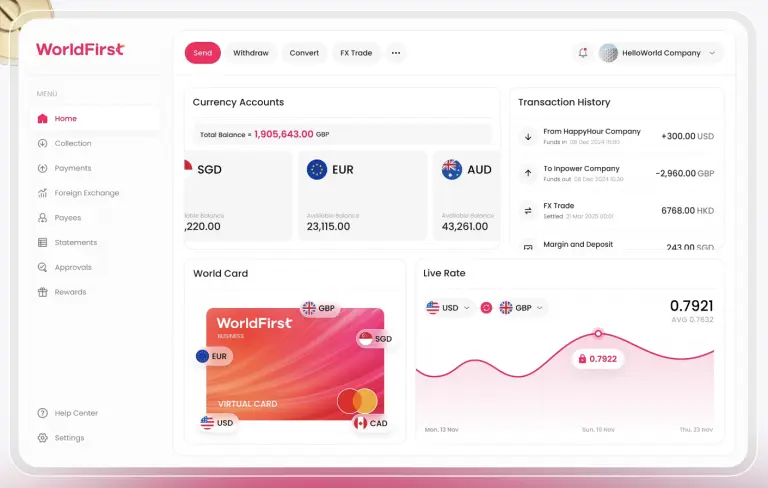
At WorldFirst, we enable international e-commerce sellers to benefit from simpler, faster and more affordable cross-border payments.
With a World Account, you can hold funds in 20+ currencies, receive payouts effortlessly from global marketplaces and make local payments – all from one place. Over the last two decades, thousands of online sellers have transferred over $300 billion through WorldFirst.
Here are three reasons why you should open a World Account today if you’re looking to sell online in Australia and New Zealand.
1. Hold your profits in 20+ currencies, including AUD and NZD
With a single World Account, you can open currency accounts and hold funds in 20+ currencies. These include Australian dollar, New Zealand dollar, GBP, USD, CAD, CNH, HKD, SGD, EUR, JPY, AED, CHF, CZK, SAR, MXN, PLN, SEK, ZAR, THB (for non-Thailand users) and MYR.
This way, you can get set up and receive funds from Australian and New Zealand e-commerce sites, without the need for a local bank account or business address. Still, with WorldFirst’s currency accounts, you’ll receive local account details, including a BSB code.
Plus, holding local currency helps you save on the cost of foreign exchange fees. Rather than converting all of your profits back into GBP or your home currency, you can keep them in AUD or NZD, to easily pay local suppliers or employees or for digital ads.
Not only does having local account details save you money on fees – it enables you to send and receive money more quickly too. That’s because the accounts use local payment networks, rather than international networks such as SWIFT.
2. Pool your global e-commerce funds and manage your finances in one place
Rather than juggling bank accounts in every country in which you operate, with a World Account you can bring all your e-commerce finances into one place.
Some e-commerce companies prefer to have separate accounts to receive profits from each marketplace on which they sell. But this is no longer necessary with a World Account. Instead, you can open up to 14 accounts in each currency that you hold – and manage them in one dashboard – to give you improved visibility on your revenue.
It’s also possible to connect your World Account with 100+ global marketplaces – including Amazon, Etsy and Kogan – as well as 30+ payment platforms. It makes it much easier to receive payouts from these platforms.
What’s more, at WorldFirst, we have an exclusive integration with 1688.com, the Chinese platform for sourcing wholesale. It gives you access to thousands of affordable international suppliers.
Find out more: How to source wholesale using 1688.com outside China
3. Save money on FX and transaction fees in 100+ currencies
If you’re selling abroad, you’ll typically be vulnerable to fluctuations in the foreign exchange market. In some cases, this volatility alone can cause you to pay drastically more for the same product – or receive a lot less than you were expecting in international sales.
WorldFirst can protect you from these fluctuations with our range of tools for buying and selling currency. With these, you can protect your margin and assure greater stability in your income.
For instance, with a forward contract, you can lock in exchange rates for up to 24 months, so you can better forecast your income.
Alternatively, you can use a firm order that instructs us to exchange funds when a target rate is reached. It means you won’t need to monitor the market yourself. Instead, we’ll do the hard work, so you can focus on maintaining a high-quality e-commerce store.
Open a World Account today to support your expansion into Australia and New Zealand
Ready to expand your online business into a new market? At WorldFirst, we can help you scale profitably, simply and securely.
Setting up a World Account is easy. You can do the whole process online. All you’ll need is a couple of documents for verification, and you’ll be verified usually within one business day.