Opening a small business bank account should be simple. But for many small businesses in 2025, it’s still far from easy.
There are fees to compare, eligibility checks to pass and overdraft requirements to meet. Plus, that’s not to mention limits on things like cheques, cash deposits or even debit card usage abroad.
Often when you try to open a business account, you hit the same roadblocks:
- Slow, outdated onboarding – requiring proof of address or in-branch visits that can be especially challenging for remote or international sellers
- Unclear pricing with monthly fees, inflated FX markups and withdrawal costs that quietly cut into your profits
- Limited currency options, making it hard to hold, pay or get paid in the currencies your business actually uses
- Painfully slow international transfers, routed through SWIFT
Even many top-rated online banking or digital business bank accounts fall short of what they promise:
- They may let you apply online, but still restrict what currencies you can receive
- They rarely integrate smoothly with marketplaces like Amazon, Etsy or TikTok Shop
- And they often provide little visibility or control over your global cash flow, making it harder to manage business finances
If this sounds familiar, this guide is for you.
We’ll walk you through:
- The UK’s best bank accounts for small businesses compared
- What small businesses should look for in a business current account in 2025
- WorldFirst: The multi-currency account built for global businesses growth
- Four alternative bank accounts for small businesses
Want to skip ahead? Open a WorldFirst business account online in under 30 minutes and start managing international payments with transparent FX fees and fast setup.
The UK’s best bank accounts for small businesses compared
| Monthly fee* | FX rates / fees* | Currencies you can hold and get paid in | International payments | Account opening process | Best for | |
|---|---|---|---|---|---|---|
| WorldFirst** | £0 | Transparent, competitive | Hold in 20+ and pay in 100+ currencies | Same/next-day payments in major currencies | Fully online | SMEs trading internationally |
| HSBC Business Currency Account | £96–£180¹ | £17-£30/send; 2.75% for FX card payments | 90+ currencies | Online and phone transfers (SWIFT) | Must be an existing business customer; apply via relationship manager | Larger UK-based businesses with a relationship manager needing FX access through a traditional bank |
| Starling Bank | £0² | 0.4% conversion fee; £0.30 for local network payments; £5.50 for SWIFT transfers; no markup on exchange rate | GBP only | Send to 34 countries in 17 currencies; processed Mon-Fri only; SWIFT or local network | Fully online via mobile/web app | UK freelancers and small businesses needing simple low-fee international transfers |
| Monzo Business Account | £0 (no monthly fees) or a paid Business Pro plan for £9 a month (Team Plan £25)³ | Wise integration – mid-market rate + transparent fee (e,.g. £0.41 + 0.35% for EUR) | GBP only (no ability to hold or receive foreign currencies) | Yes – outbound only, via Wise (35+ currencies) | 100% online, UK residents only | UK individuals making occasional international payments |
| Barclays International | From £6.50/month⁴ | Bank-set FX rate + possible intermediary fees | 12+ currencies incl. USD, EUR, AED | Yes – SWIFT-based (3–5 days, fees may apply) | Manual onboarding; must hold UK Barclays Business Account | Established UK businesses with complex FX or trade finance needs |
*Fees reflect rates checked in July 2025 and are subject to change
**WorldFirst is a non-bank financial services provider
¹ Business Banking price list (PDF, 377KB)
² https://www.starlingbank.com/send-money-abroad/
What small businesses should look for in a business current account
The wrong bank account can mean high fees and a complex digital experience. If you want to avoid headaches like these, here’s what to prioritise when choosing the best business bank account:
- Fast, fully online setup: Look for an account you can open entirely online, so you can get started in a day or two – even if you’re selling across borders
- Multi-currency accounts with local receiving details: If you want to sell in the US or Europe, you often must have local account details (like a US ACH or EU IBAN) to get paid by e-commerce marketplaces or payment gateways. The best accounts let you open these instantly without local residency or a foreign entity
- Transparent pricing with no hidden fees: Watch for monthly fees, hidden transaction fees or account fees, and inflated FX rates that erode your profit margins. Choose an account with clear, upfront pricing so you know exactly what you’ll pay to send, receive and hold money
- Fast reliable international payments: Paying suppliers in China or Europe? Avoid traditional SWIFT transfers that can take up to six days and rack up intermediary fees. Look for an account that leverages local payment rails to deliver funds same-day or next-day in your supplier’s local currency
- Marketplace and payment platform integrations: If you sell on Amazon, Etsy, TikTok Shop or other online channels, you shouldn’t have to open a new bank account for each market. Choose an account with direct integrations so you can get paid quickly in local currencies without expensive intermediaries
- Real-time FX tools and competitive rates: Foreign exchange fees add up fast. The right account should offer live rates you can lock in, transparent conversion costs and tools like rate alerts or forward contracts to help you plan cash flow and protect margins
- Easy visibility and control: Managing multiple currencies and marketplace sales shouldn’t mean chaos. Look for an account with a single, intuitive online dashboard where you can see balances, manage payments and track spending in real time
- Responsive human customer support: When payments are delayed or something goes wrong, you need more than a chatbot. Pick a provider with local, multilingual teams and dedicated account managers who understand international trade and can help you fix issues quickly
- Business debit or credit cards: Make sure you can issue team cards with spend limits or earn rewards on essential purchases. For small businesses, virtual cards are often a more convenient option
Here are some of the most common hidden costs that can quietly drain your profits, and what to look for instead.
| Hidden cost to watch out for | What it means for you | What to look for instead |
|---|---|---|
| Monthly maintenance fees | £5–£15/month just to keep the account open | Zero-fee accounts with no monthly charges |
| Hidden FX markups on currency conversion | Banks often add 2–5% above mid-market rates, e.g. £50 extra per £1,000 sent | Transparent, live FX rates you can see before converting |
| SWIFT transfer fees | £20–£40 per international payment. Bank transfers can take up to 6 days | Local payment rails for same-day/next-day delivery at lower cost |
| Fees for receiving international payments | £5–£10 just to receive foreign currency payments. Costs can add up quickly | Free receiving in multiple currencies with local account details |
| Tiered or unclear pricing | Cheap at first but extra fees for users, higher volumes or support | Predictable, transparent pricing that scales with your business |
WorldFirst: The best multi-currency account built for global business growth
Not every business bank account is designed with international sellers in mind. If you’re selling internationally, paying overseas suppliers or collecting from marketplaces around the world, WorldFirst’s World Account is purpose-built for global sellers.
Partnering with leading banks such as J.P. Morgan, Barclays and HSBC, WorldFirst has worked for two decades to make international business payments smarter and simpler. We’ve helped over a million businesses process more than $300 billion in transaction value with our simple, secure global payment solutions.
Here are a few reasons why small businesses should open a World Account for free today.
Hold funds in 20+ global currencies and get paid like a local
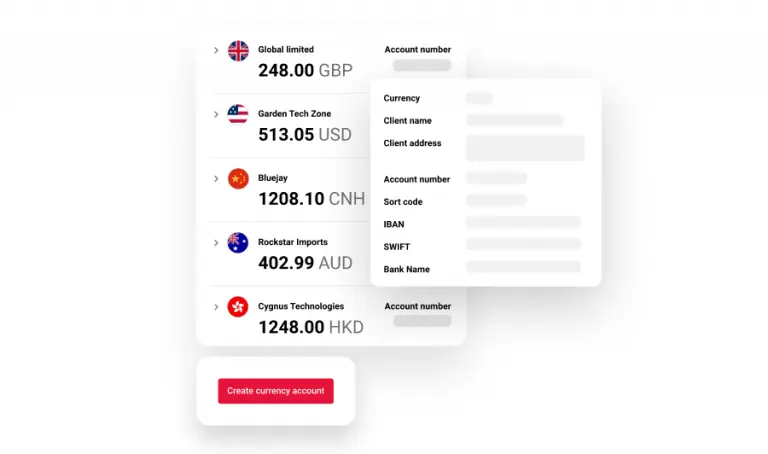
One of the biggest challenges for small businesses expanding internationally is simply getting paid. To receive payments in currencies like USD, EUR or JPY, many UK-based businesses are forced to open foreign subsidiaries, register for local tax IDs and wade through complex compliance paperwork.
This step is often mandatory for e-commerce sellers, with marketplaces like Amazon, Shopee, Rakuten or TikTok Shop often needing local bank details to release payouts in certain currencies. But with this process, it can take weeks before you can start selling and get paid.
WorldFirst removes this barrier entirely. With a World Account, you can instantly open local receiving accounts in 20+ currencies (including USD, EUR, CNH,, AUD, JPY and AED) without needing local residency or a foreign entity.
You get local bank details (like a US ACH number or EU IBAN), so you can:
- Receive sales revenue like a local seller in that market
- Avoid payout delays, rejected payments and expensive aggregator fees
- Hold balances in those currencies and convert only when rates are in your favour
That means faster cash flow, less red tape and more significant cost savings. It can eliminate the need for legal setup fees, cross-border collection services or high FX markups from payment intermediaries.
Get started quickly with a fast, fully online setup
To open a business account, many traditional banks still require in-person appointments, proof of a UK trading address and weeks of back-and-forth.
With WorldFirst, on the other hand, setup is fast, simple and 100% online. You can:
- Apply in under 30 minutes
- Upload your business documentation securely
- Get approved in as little as 1–2 business days
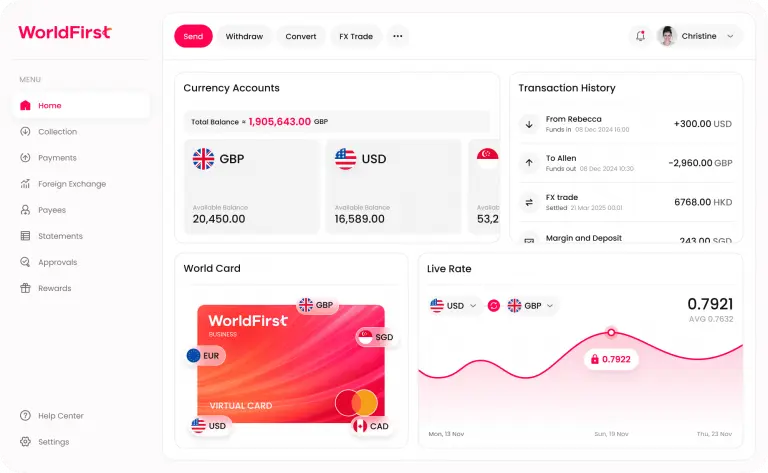
There’s no need for a UK entity, no in-branch visits and no waiting around. Once approved, you’ll get immediate access to your dashboard, where you can start:
- Receiving payments in 20+ currencies
- Sending funds to suppliers worldwide
- Tracking balances and transactions across all your currency accounts in real time
Once you’re set up, you can manage all your spending and business finances in one place, thanks to WorldFirst’s integration with accounting software such as Xero and QuickBooks.
Issue virtual cards to spend in 15 currencies
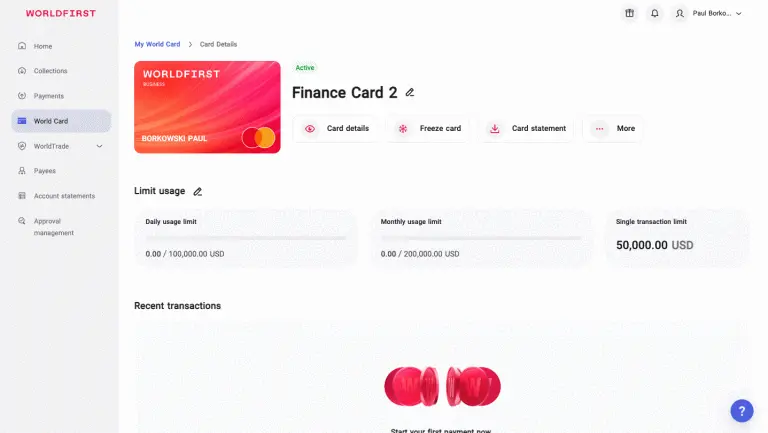
Juggling team expenses, ad budgets and international subscriptions across multiple currencies can get messy fast. With WorldFirst, you can instantly issue virtual cards to spend in 15 currencies directly from your World Account balances, without unnecessary conversions or hidden FX fees.
Use virtual cards to:
- Pay for digital ads on platforms like Meta, Google or TikTok in local currencies
- Purchase SaaS tools, inventory or services from global suppliers
- Assign cards to team members, campaigns or departments with custom names and spending limits
Ultimately, you’re in control, with one dashboard to track spending in real time, pause or cancel cards instantly and set limits to avoid overspending while reducing the impacts of fraud.
Ready to open a business account used by over a million small businesses worldwide? Sign up for a World Account for free today.
4 alternative bank accounts for small businesses
Different businesses need different things from their bank account. Below, you’ll find a breakdown of alternative account providers on the UK market – highlighting their strengths, limitations and when they might be a better (or worse) fit for your business.
1. HSBC Business Account: Traditional banking for established businesses
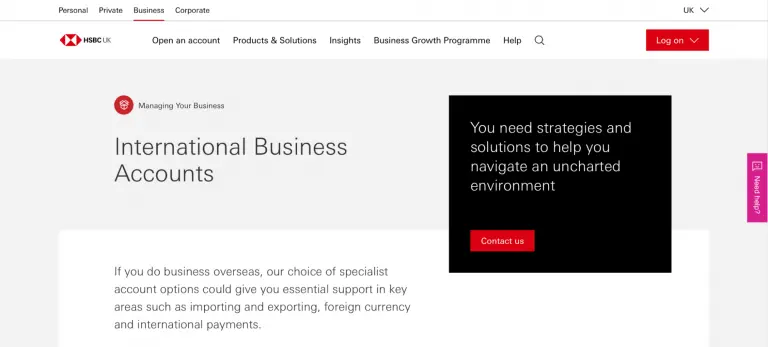
The HSBC Business Currency Account is designed for existing HSBC business customers who need to hold, send and receive funds in foreign currencies. You can open accounts in four currencies, including USD, EUR and HKD – helping reduce exchange rate risk by eliminating the need to convert funds for every transaction.
To open an account, you must already hold a GBP business current account with HSBC and apply through your relationship manager – with monthly fees ranging from £96 to £180, depending on your business tier.
This is a solid option for larger companies already within HSBC’s network – but for businesses needing faster onboarding, marketplace integrations or real-time FX tools, a fintech solution may be a better fit.
2. Starling Bank Business Account: Simple, modern banking with low-cost FX
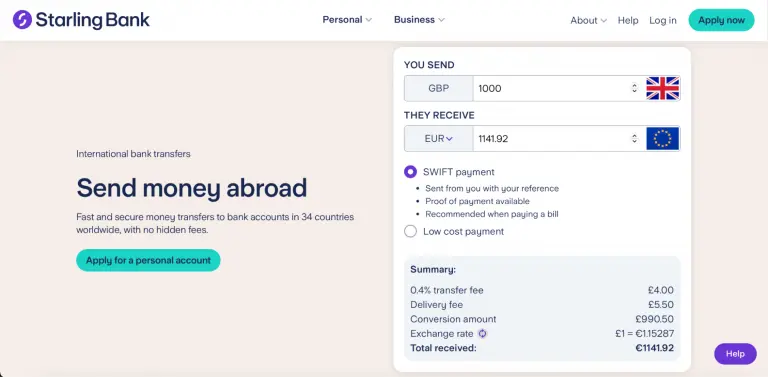
Starling Bank offers a free, digital-first business current account that’s popular with UK start-ups, sole traders and small businesses. While it doesn’t support multi-currency balances or local receiving accounts abroad, it does offer low-cost international payments with transparent, mid-market exchange rates – a rare feature among mainstream banks.
Through the app or online banking, you can send money to 34 countries in 17 currencies, including EUR, AUD and ZAR. Importantly, Starling doesn’t mark up its exchange rates – you get the mid-market rate, which helps keep cross-border transfer costs down. However, the account only holds GBP and you can’t receive international payments in other currencies without conversion. Incoming EUR payments are converted automatically with a 2% fee.
Setup is fast and fully digital, and the app offers strong visibility and real-time spending alerts. But if your business needs to get paid in multiple currencies or connect to international marketplaces like Amazon or TikTok Shop, Starling isn’t the right fit.
3. Monzo Business Account: A UK digital bank offering international transfers via Wise
Monzo is a fully licensed UK digital bank with over six million customers, including businesses from the self-employed to limited companies. While it doesn’t offer business banking outside the UK or support multiple currencies, it does allow users to send international payments through a built-in integration with Wise.
To use it, you’ll need to have a Monzo account (UK residents only) and from there, can transfer money to 35+ currencies using Wise’s mid-market exchange rate and transparent fee structure. It’s important to note here that Monzo doesn’t support receiving international payments in other currencies and all transfers must be sent from GBP.
You can find out more about the Monzo and Wise integration here.
4. Barclays International Account
Barclays is a UK bank and its International Business Account is designed for UK-registered businesses that need to send and receive money in foreign currencies. You can open accounts in a range of currencies – including USD, EUR and AED – and access services like FX hedging and trade finance. Barclays also offers tailored support for businesses that meet their eligibility criteria.
However, this account comes with a few restrictions that might limit its usefulness for small online sellers. The international payments infrastructure is SWIFT-based, meaning transfers can take up to five days and may incur intermediary bank fees. It also doesn’t currently offer marketplace integrations or the ability to receive platform payouts like Amazon or TikTok Shop in local currencies, making it less suitable for e-commerce sellers.
Find out more about Barclays International Banking here.
The right business account is more than just a place to hold money
The right account can save you money, reduce admin and help you grow. If you’re running a local service business in the UK with no plans to trade abroad, a traditional high-street account might do just fine.
But if you sell online, work with international suppliers or want the freedom to expand overseas without expensive, opaque fees, you need something more purpose-built.
WorldFirst’s World Account was designed specifically for businesses trading globally:
- Open 20+ local currency accounts with no local entity required
- Get paid like a local on 130+ marketplaces
- Pay suppliers in 100+ currencies – 80% of payments land on the same day
- Lock in competitive FX rates with full transparency
- Issue virtual cards in seconds to manage spend
- Do it all online, with approvals in as little as 1–2 business days
If you’re serious about scaling your business overseas, the right account is essential.
Ready to simplify your international banking and set your business up for global growth?
Open a World Account for free today and start trading without borders.