Your supplier has sent the invoice, but you need to make sure the beneficiary name, account number and SWIFT code match the supplier’s bank-issued record. An incorrect or missing field can lead to an enquiry and additional checks before the funds reach the supplier.
SWIFT reports that around 2%–5% of payments result in enquiries on a given day. An 8-character SWIFT code may look incomplete when a payment form asks for 11 characters, but both formats can be valid. The key is that the code and account details match the intended supplier and invoice.
This article explains how SWIFT codes work, where to find codes for leading UK banks and what to verify before paying an overseas supplier.
Key takeaways:
- A SWIFT code identifies the financial institution in the payment instruction: You still need the supplier’s account number or IBAN to direct the funds to the correct account
- 8- and 11-character SWIFT codes can both be valid: The first eight characters identify the institution, while the optional final three may point to a branch or organisational unit
- Always verify supplier payment details before sending funds: Match the beneficiary to the invoice, confirm the code against bank-issued records and check any changed details through a separate contact channel
- Track the payment beyond the initial confirmation: Use the payment reference or UETR to follow progress, distinguish bank receipt from supplier account credit and reconcile the final amount against the invoice
- WorldFirst shows the available payment route before approval: Check whether the supplier payment will use a local network or SWIFT, alongside the expected delivery and payment charge
Open a World Account to check the available payment route, expected delivery and total cost before approving your next supplier invoice.
What a SWIFT code tells you about a supplier payment
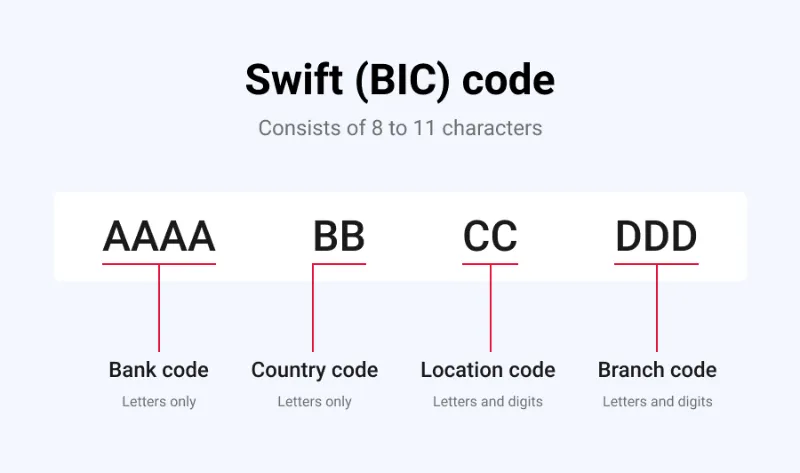
A SWIFT code is built from fields that identify the institution, country, location and, where included, a branch or organisational unit.
Is a SWIFT code the same as a BIC?
In payment instructions, SWIFT code and BIC usually mean the same thing. BIC stands for Business Identifier Code, the formal name under the ISO 9362 standard.
Banks and payment providers more commonly use the term SWIFT code, while fields labelled BIC, SWIFT or SWIFT/BIC usually request the same identifier.
How to read an 8- or 11-character SWIFT code
An 8-character BIC follows this structure:
AAAA BB CC
- AAAA: Four-character business party prefix
- BB: Two-letter country code
- CC: Two-character business party suffix
Adding an optional 3-character branch identifier creates an 11-character code:
AAAA BB CC DDD
The final three characters can identify a specific branch or organisational unit linked to the main institution. An 8-character code isn’t incomplete just because an 11-character version exists.
What a SWIFT code doesn’t identify
Your supplier’s account number or IBAN is separate from the SWIFT code. The code also doesn’t determine the route the payment takes, the FX rate or charges applied, or the final amount your supplier receives. Those depend on the payment network and the banks involved.
Read more: SWIFT vs SEPA: key differences
Why WorldFirst doesn’t rely on SWIFT for every supplier payment
While WorldFirst does use SWIFT, you also have other options. You can send eligible supplier payments through local payment networks, depending on the currency, destination and beneficiary details.
When a supplier payment still requires SWIFT
SWIFT remains relevant when a supported local route doesn’t cover the supplier’s bank, currency or destination. Correspondent banks may process the transfer when the sending institution doesn’t have a direct banking relationship with the beneficiary bank.
How local payment networks differ from SWIFT
A local route delivers the funds through the destination market’s domestic banking network. The supplier’s bank receives the transfer similarly to a payment sent within that country.
WorldFirst supports local payment networks in markets including the UK, US, EU and Singapore. Route availability depends on the currency and beneficiary account, not the supplier’s country.
How the World Account connects currency balances and supplier payments
The World Account is a multi-currency account that can hold funds in 20+ currencies. Paying from a balance that matches the invoice currency can avoid another conversion at the point of payment.
The payment route and currency conversion remain separate. A GBP-funded payment for a USD invoice still requires conversion, even when the funds later move through a local US network. Paying from an available USD balance can remove that conversion from the payment step, but it doesn’t remove FX risk because the exchange rate may move before you acquire the balance.
Before approval, WorldFirst shows the payment charge, expected delivery and available route, allowing you to review the transfer and any required conversion together.
UK SWIFT codes at a glance
The table compares WorldFirst’s route-based approach with the principal UK SWIFT codes published by the five banks covered below:
| Provider | SWIFT code or available route | Format or important point |
| WorldFirst | Local payment network or SWIFT | Route depends on the currency, destination and beneficiary details |
| Barclays UK | BUKBGB22 | 8-character BIC |
| HSBC UK | HBUKGB4B | 8-character example; confirm the account-specific BIC |
| NatWest | NWBKGB2L | 8-character BIC; also published as NWBKGB2LXXX |
| Lloyds Bank | LOYDGB2L | 8-character BIC |
| Santander UK | ABBYGB2LXXX | 11-character BIC |
1. Barclays SWIFT code
Barclays Bank UK PLC lists BUKBGB22 as its main UK SWIFT or BIC code.
SWIFT code format breakdown:
BUKB GB 22
- BUKB: Four-character business party prefix for Barclays Bank UK
- GB: United Kingdom country code
- 22: Two-character business party suffix
Barclays identifies 22 as its head-office code.
Where to find and verify it:
The code appears in Barclays Online Banking, on account statements and in the bank’s official international payment guidance.
2. HSBC SWIFT code
HSBC uses HBUKGB4B in its published BIC example but states that the actual code can vary by account.
SWIFT code format breakdown:
HBUK GB 4B
- HBUK: Four-character business party prefix for HSBC UK
- GB: United Kingdom country code
- 4B: Two-character business party suffix
Where to find and verify it:
HSBC shows the account-specific BIC on the latest bank statement.
Read more: HSBC multi-currency account review
3. NatWest SWIFT code
NatWest lists NWBKGB2L as its SWIFT address and also shows the 11-character form NWBKGB2LXXX.
SWIFT code format breakdown:
NWBK GB 2L
- NWBK: Four-character business party prefix for National Westminster Bank
- GB: United Kingdom country code
- 2L: Two-character business party suffix
Where to find and verify it:
NatWest displays the BIC in Online Banking, on account statements and under View or share account details in the mobile app.
4. Lloyds Bank SWIFT code
The code for international payments to a Lloyds Bank account is LOYDGB2L.
SWIFT code format breakdown:
LOYD GB 2L
- LOYD: Four-character business party prefix for Lloyds Bank
- GB: United Kingdom country code
- 2L: Two-character business party suffix
Where to find and verify it:
In Online for Business, select ‘More’ → ‘View IBAN and BIC’ in the new layout, or ‘More actions’ → ‘Account information’ in the previous version. The BIC also appears on the first page of a paper statement.
5. Santander UK SWIFT code
Santander UK lists ABBYGB2LXXX as its SWIFT or BIC code for receiving international payments.
SWIFT code format breakdown:
ABBY GB 2L XXX
- ABBY: Four-character business party prefix for Santander UK
- GB: United Kingdom country code
- 2L: Two-character business party suffix
- XXX: Three-character branch identifier in Santander’s published BIC
Where to find and verify it:
Santander displays the BIC on its international payment pages and in Online Banking under Account Services, Other services and View details.
How to verify a supplier’s SWIFT code before you pay
A valid SWIFT code can still be wrong for a particular supplier account.
Four checks provide a clearer view of whether the payment instructions match the supplier and receiving account:
1. Match the beneficiary to the invoice and contract
The beneficiary name should correspond with the supplier entity named in the contract, purchase order or invoice. A different name may be legitimate where a group treasury company or payment agent receives the payment, but the connection should be documented in the supplier records.
Those records should also explain why the receiving bank is in a different country or why the account currency differs from the invoice.
2. Confirm the code against the supplier’s bank details
A bank statement, account confirmation or online banking record provides a stronger reference than payment details copied from an invoice alone.
The bank-issued records should show the bank’s legal name, SWIFT code, beneficiary account name and account number or IBAN, along with any separate branch or intermediary bank instructions.
The receiving bank’s official guidance can clarify which published BIC applies when the group uses different codes for separate entities or account types.
3. Treat new or changed details as a separate verification event
A familiar email address doesn’t prove that revised payment instructions are genuine.
The National Cyber Security Centre and UK Finance recommend confirming new or changed supplier bank details through a separate channel, using contact information already held on file rather than details included in the change request.
4. Use the SwiftRef BIC Directory as a secondary check
The SwiftRef BIC Directory lists the registered institution’s name and address for each BIC code. It doesn’t confirm ownership of the receiving account.
SWIFT code vs IBAN, sort code and routing number
Each identifier answers a different part of the payment instruction: the institution, the account or the domestic route.
| Identifier | What it identifies | Format | When it may appear in supplier payment details |
| SWIFT code or BIC | The institution named in the payment instruction | 8 or 11 characters | When an international payment route requests the receiving institution’s BIC |
| IBAN | An individual bank account in a standard international format | Varies by country | When paying a supplier account in a country that uses the IBAN standard |
| Sort code | The UK payment service provider or routing point used to route and settle the payment | Six digits | When a supplier provides local UK GBP account details |
| Routing number | The US financial institution responsible for processing the payment | Nine digits | When a supplier provides local US payment details |
The payment route determines which combination appears in the supplier’s instructions. An international route may request both an IBAN and SWIFT code, while a local UK or US route may use domestic routing details alongside the account number.
How to track a SWIFT supplier payment
A payment confirmation shows what was submitted, but it doesn’t necessarily prove that the supplier can access the funds. A complete tracking trail links the provider’s confirmation, the SWIFT reference and the supplier invoice.
The four steps below show what to record, how to trace the payment and when the supplier invoice can be closed.
1. Use the payment confirmation as the starting record
The confirmation typically records the amount, currency, beneficiary, payment reference and submission date. These details identify the transfer if the supplier or provider later needs to trace it.
2. Find the UETR
The Unique End-to-end Transaction Reference (UETR) is a 36-character identifier included in a SWIFT payment instruction. Institutions handling the payment use the same reference throughout the payment chain.
Depending on the provider, the UETR may appear in the payment details or confirmation. Where it isn’t visible to the payer, the sending institution can use it to trace the transfer through SWIFT’s tracking services.
3. Distinguish payment status from supplier receipt
Payment statuses describe different stages, but the exact wording varies between providers:
- Payment submitted: The provider has usually received the payment instruction
- Payment processed: The provider may have completed its own processing or passed the payment to the next institution
- Payment reached the beneficiary bank: The payment has arrived at the receiving institution
- Supplier account credited: The funds have been posted to the supplier’s account
Local checks, reporting requirements or internal bank processing may still affect how quickly the supplier can access the funds.
4. Match the payment to the supplier invoice
Where the payment field allows, include the invoice number, purchase order or agreed supplier reference. A clear reference allows the supplier to match the funds and gives the finance team a consistent link between the approval, payment and invoice.
Reconciliation should compare the invoiced amount, the amount sent and the amount the supplier confirms receiving. Record and investigate any difference before marking the invoice as settled in full.
Reduce reliance on SWIFT with WorldFirst
You need to pay a US supplier US$75,000 before they release a container of seasonal stock. The invoice is in USD, the supplier expects the full amount, and your purchase-order number needs to appear in the payment reference.
Using the route differences explained above, the payment-fee comparison is straightforward. WorldFirst currently lists a £0.30 fee for a local USD payment and £4 for an international payment, a difference of £3.70 before any third-party charges or currency conversion costs.
A SWIFT route may also involve deductions by intermediary banks. If three intermediary banks each charged £25, they could reduce the transfer by up to £75. Adding the £4 international payment fee creates an illustrative total of up to £79, compared with £0.30 for an eligible local USD payment. The potential difference is up to £78.70, excluding FX costs and any beneficiary-bank charges.
Actual charges depend on the route, beneficiary bank and payment instructions, so review the payment details shown before approval.
For this invoice, you can:
- Check the full funding cost: Pay from an available USD balance or convert GBP, then review the exchange rate, payment charge and total GBP debit
- Confirm the supplier amount: Check that the amount intended for the supplier matches the US$75,000 invoice
- Meet the release deadline: Review the expected delivery date before approving the payment
WorldFirst isn’t a bank. World First UK Limited is authorised by the Financial Conduct Authority as an Electronic Money Institution under the Electronic Money Regulations 2011, with FCA Firm Reference Number 900508.
Open a World Account to check the available route and full cost before approving your next overseas supplier payment.
FAQs
1. Who pays the charges on a SWIFT payment?
The charge instruction determines who pays the fees, but the available options can vary by provider and payment route.
With OUR, you cover the applicable charges; with SHA, you pay your provider’s charges while the supplier may pay other bank fees; with BEN, charges are deducted from the amount sent to the supplier.
2. What is an MT103 payment confirmation?
An MT103 is the legacy SWIFT message used for a single customer credit transfer. Since 22 November 2025, ISO 20022 has been required for in-scope cross-border payment instructions, so your provider may supply a different confirmation containing the payment details and references.
3. Can you cancel or recall a SWIFT payment after submitting it?
You can request a cancellation or recall, but recovery isn’t guaranteed once the payment has entered the banking chain. Act quickly and give your provider the payment reference, amount, currency and submission date.
4. What happens when a SWIFT payment is rejected or returned?
A rejected payment is stopped before settlement, while a returned payment is sent back after settlement has occurred. Check the reason, correct the payment details and confirm the amount returned before sending a replacement.
5. What happens if the payment currency doesn’t match the supplier’s account currency?
The receiving bank may convert or reject the payment, depending on its account rules. Confirm that the account can receive the invoice currency before paying, as the bank’s conversion could leave part of the invoice unpaid.
Sources:
- https://www.swift.com/standards/iso-20022/supercharge-your-payments-business/chapter-6
- https://www.swift.com/standards/data-standards/bic-business-identifier-code
- https://www.ncsc.gov.uk/collection/board-toolkit/principle-e-assurance-and-oversight/implementing-effective-cyber-security-measures
- https://www.ukfinance.org.uk/news-and-insight/press-release/take-five-protect-your-business-scams-end-tax-year-nears
- https://www.swift.com/products/swiftref-bic-directory
- https://www.swift.com/payments/what-unique-end-end-transaction-reference-uetr
- https://www.barclays.co.uk/help/international/payments/making-and-receiving-international-payments/what-iban-swiftcode/
- https://www.business.hsbc.uk/en-gb/solutions/iban-and-bic
- https://www.natwest.com/business/trade-finance/online-solutions-and-tools/iban.html
- https://www.lloydsbank.com/business/help-and-support/account-management/find-iban-bic.html
- https://www.santander.co.uk/business/support/payments/making-international-payments