






























Home > blog > Global Business Tips > How to pay multiple suppliers simultaneously: 7 steps to fast business payments
How to pay multiple suppliers simultaneously: 7 steps to fast business payments
Last update:


UK businesses, especially online retailers and e-commerce sellers, face a high volume of supplier invoices every month. When payments fall behind, the effects are immediate. Late invoices squeeze cash flow, delay fulfilment and under upcoming UK rules, can even lead to compliance issues.
Government data shows late B2B payments drain around £11 billion from the economy each year, with 38 small firms closing daily because the cash they rely on doesn’t arrive in time. Automating multi-supplier payments is one of the most effective ways to ease this pressure.
This guide shows how to pay multiple suppliers simultaneously with fast, reliable tools and why batch payments matter.
Key takeaways:
- Late supplier payments cause operational strain and damage supplier trust: When payments fall behind, deliveries slow, terms tighten and businesses lose flexibility. Paying on time keeps goods moving and protects supplier relationships
- Manual payment processes create delays and frequent errors: entering each transfer one by one increases the risk of mistakes, forces teams to repeat the same steps and makes cash flow planning harder
- Batch payments make it easy to pay multiple suppliers simultaneously: By uploading a single file containing all supplier details, businesses can run the entire payment cycle in a single step
- Automation tools help streamline the complete purchase-to-payment workflow: Banking platforms, ERPs and fintech accounts reduce manual entry, support multi-currency payments and centralise reconciliation
- WorldFirst provides a practical solution for large or international supplier lists: With the World Account, businesses can upload a single batch file, pay up to 200 suppliers at once, manage 20+ currency accounts and track every payment from a single dashboard
Open your World Account and see how simple it is to pay multiple suppliers simultaneously.
Why fast supplier payments matter
Paying suppliers on time protects cash flow, keeps goods moving and reduces friction across the supply chain.
Across the UK, late payment remains a significant issue. A 2025 survey found that 9 out of 10 companies experienced delays in paying suppliers and more than half said these delays have become more frequent in the past year.
Small businesses feel this most. QuickBooks’ 2025 data shows that 62% of UK small businesses have unpaid invoices, with an average of more than £21,400 tied up in late payments.
These delays create real pressure. When money arrives late, suppliers slow deliveries, tighten terms or shift to cash-on-delivery. Stock becomes harder to plan, margins weaken and businesses lose flexibility at key moments. For many SMEs, this is a continuous challenge.
Regulation is now moving toward stricter expectations. The updated 2025 payment-practices rules introduce maximum payment terms of 60 days (set to reduce to 45 days after a transition period), along with faster invoice-verification requirements and stronger enforcement against habitual late payers. The policy direction is clear and aims to create more predictable cash flow for suppliers of all sizes.
For UK businesses, especially those working with overseas manufacturers or seasonal inventory cycles, prompt and reliable payments help secure better terms, reduce operational risk and strengthen supplier relationships.
Challenges of manual supplier payment processes
Many UK businesses still handle supplier payments manually – logging into bank portals and entering each payment individually. This approach is time-consuming and error-prone. For example, a finance clerk may spend minutes per payment copying invoice details and account numbers.
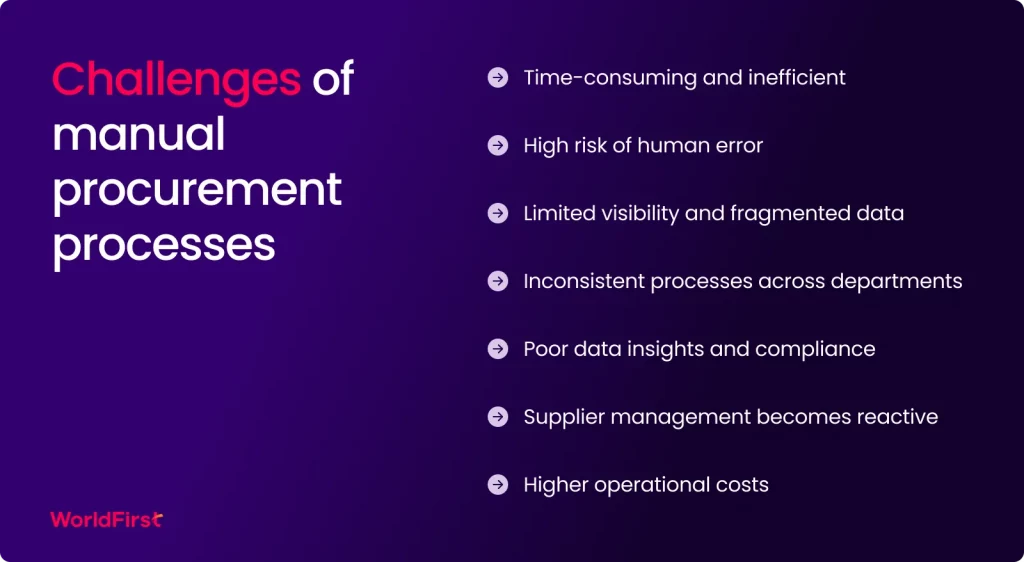
Entering dozens of payments could take hours. Manual entry invites mistakes: mistyping an account number or amount can cause failed transfers (which then require rework).
A UK survey found that 36% of businesses attribute late payments to administrative errors (such as missing or mislogged invoices). Even larger firms with complex processes still experience errors.
Businesses that use several banks for different currencies also manage multiple logins and formats, which raises both workload and security concerns.
The process typically involves several time-consuming steps:
- Collecting and reconciling invoices from emails, shared folders or spreadsheets
- Entering each payment manually in online banking
- Approving every supplier payment separately
- Updating ledgers or finance tools one transaction at a time
- Reconciling each outgoing payment line by line
Each step slows teams down. A recent study found that small businesses spend an average of 86 hours a year chasing unpaid invoices. That is time that companies could spend supporting customers, fulfilling orders or growing. Manual processes also provide limited visibility. It is difficult to see which payments are pending or due, which makes cash planning unreliable.
Manual payments don’t scale when you need to pay multiple suppliers simultaneously.
What are batch payments?
Batch payments (or bulk payments) let a business send money to multiple recipients in a single transaction.
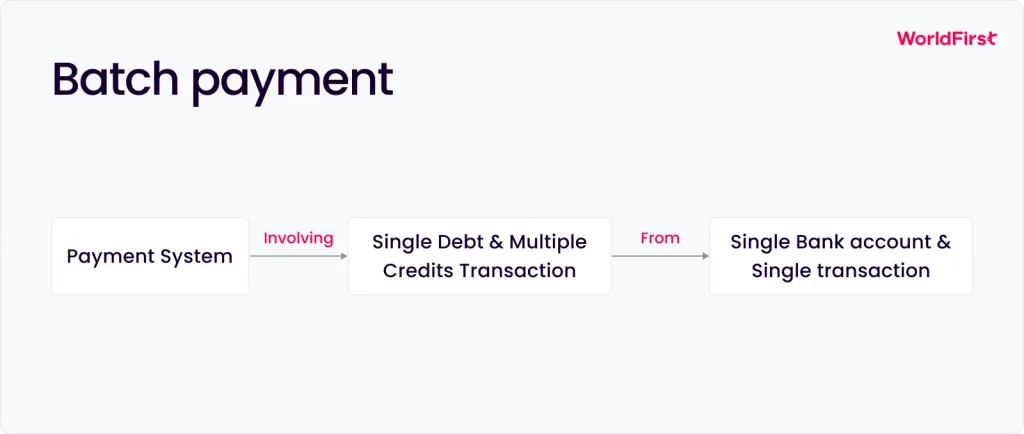
Instead of paying each supplier separately, you prepare a single “batch file” containing all payee account details, amounts and references. This file is then uploaded or submitted to your bank or payment platform. The system processes all transfers together, eliminating the need for repetitive data entry.
Batch payments also guarantee everyone is paid on exactly the scheduled date, eliminating the chance that a single missed transfer disrupts the schedule.
Most corporate payment systems support batch transfers. UK Bacs Direct Credit (commonly used for payroll) can also pay suppliers in bulk. Similarly, Faster Payments can batch up to many recipients through corporate banking portals.
Modern platforms even let you schedule a future date for the entire batch so that you can set next week’s supplier disbursements all at once. World Account, for instance, allows scheduling invoice payments in advance and supports batch payments for up to 200 suppliers at once.
By consolidating dozens of transfers into a single step, batch payments drastically cut manual workload and speed up supplier settlements.
Automated payment solutions
As supplier networks expand, manual payment work slows teams down and increases the risk of errors. UK businesses that rely on domestic and international suppliers need dependable tools that reduce admin time, improve accuracy and give a clear view of upcoming liabilities.
Automated payment systems support these goals by centralising workflows and making it far easier to pay multiple suppliers simultaneously.
Here are the main options businesses use:
1. Bank and corporate payment services
UK banks provide long-established methods for bulk payments. The most common approach is file upload. Finance teams prepare a payment file, usually in a Bacs or XML format, containing supplier details, amounts and references. Once uploaded to online banking, the bank processes the entire batch in one run. This approach has been standard practice for years.
However, the setup can be complex. File formats vary across banks and validating payments before submission requires time and expertise. Direct debits help automate recurring bills, but traditional tools often work in only one currency or country at a time. Paying overseas suppliers means switching to SWIFT or local clearing networks, each with its own cut-off times and interfaces. This adds manual friction and makes it harder to manage global payment runs.
Treasury platforms and corporate payment hubs centralise bank feeds for larger companies, but the workflow still relies on preparing bulk instructions and validating them before each run.
2. Accounting software and ERP integration
Accounting and ERP platforms automate much of the purchase-to-payment cycle. Systems such as Xero, Sage or NetSuite allow businesses to approve invoices and generate payment runs using the supplier data already stored in the system.
NetSuite’s integration with the World Account provides even deeper automation. All World Account transactions sync automatically into NetSuite, so teams do not need to import CSV files or manually reconcile data. Batch payments appear instantly in the ledger and finance teams can match payments to invoices and statements with a single action.
The integration also supports creating supplier payments and expense claims directly from World Account data, helping maintain accuracy and reducing month-end processing time.
For any UK business using an ERP system, this type of integration makes supplier payments a predictable, efficient routine.
3. Fintech solutions such as World Account
Fintech business accounts often provide the most streamlined way to pay multiple suppliers simultaneously, especially for companies trading across borders. WorldFirst created the World Account to support UK importers, e-commerce sellers and businesses working with multiple currencies.
The account offers 20+ local-currency accounts in key markets and supports payments in 100+ currencies. All supplier payments are managed from a single dashboard, eliminating the need to keep multiple banking portals open.
Automation features include:
- Uploading supplier details via a simple Excel template
- Scheduling payment runs in advance
- Sending batch payments to up to 200 suppliers at once
- Tracking payment status in real time
- Automatically notifying suppliers when payments are initiated
- Instant and free transfers between World Accounts
- Using local payment routes so most international payments arrive the same day
Because payments move through local networks wherever possible, around 80% of transfers reach suppliers on the same day. This keeps stock moving, reduces delays and strengthens supplier relationships. With no opening or monthly fees, the World Account provides a cost-effective payment infrastructure for businesses that manage frequent international transactions.For UK importers and e-commerce sellers, this creates a straightforward and reliable workflow. You add supplier details once, build batches in a few clicks and send payments in the right currency without delay when you connect the World Account to systems like NetSuite. The integration automatically syncs and reconciles every transaction, keeping the entire process accurate from start to finish.
Step-by-step workflow for bulk supplier payments
A straightforward workflow helps finance teams manage large payment runs efficiently and reduces the risk of errors. The steps below outline a practical approach used by many UK businesses when processing bulk supplier payments:
1. Gather invoices and supplier information
Start by collecting all approved invoices and confirming that each supplier’s bank details are accurate. Check invoice amounts, due dates and the currency required for each payment. For international suppliers, confirm that the invoice currency matches the one you intend to send.
2. Prepare the batch file
Use an Excel or CSV template provided by your bank or payment platform. Each line should include the supplier name, bank account number, sort code or IBAN, currency, amount and payment reference. Most finance teams pull this information directly from their accounting systems to ensure it aligns with approved invoices. Checking formatting at this stage prevents validation issues later.
3. Log in to your payment platform
Access your online banking or corporate payment system and navigate to the bulk-payments area. Select the option to upload a payment file or create a multi-supplier payment run. If you are paying in multiple currencies, ensure the relevant balances are available.
4. Upload and validate the file
Import the Excel or CSV file. Your payment platform will check for missing fields, invalid account numbers, or formatting errors. Correct any flagged items before proceeding. Validation ensures the entire batch can run without interruption.
5. Authorise the payment batch
Review the complete list of payments on screen. Verify supplier names, amounts and references. Make any final adjustments. Once you are satisfied, authorise the batch. Most platforms require a second layer of verification, such as an SMS code or app-based authentication, to keep payment runs secure.
6. Schedule or send the payments
Choose the payment date. You can send funds immediately or select a future date that aligns with invoice terms or internal cash-flow plans. Scheduling helps you avoid early outflows while still ensuring you pay suppliers on time.
7. Monitor and reconcile the payments
After sending the batch, track the progress through your payment platform’s status dashboard. Once the payments are clear, export the payment report or statement. Importing this into your accounting software lets you reconcile all transactions in a single step and keep your records accurate for month-end.
Why UK businesses use WorldFirst to manage bulk supplier payments
Paying many suppliers at once does not need to be slow or complicated. When UK businesses move away from manual workflows and adopt automated bulk payments, they see faster processing, fewer errors and more predictable supplier relationships. This matters most for companies working across several currencies or managing time-sensitive supply chains.
Modern tools make this level of efficiency achievable for businesses of all sizes. Batch uploads, ERP-linked payment runs and multi-currency accounts all streamline weekly and monthly payment cycles.
WorldFirst supports this with a bulk-payment system built for international trade. Through the World Account, you can:
- Upload one file and pay up to 200 suppliers at once
- Send payments in 100+ currencies
- Hold and manage 20+ local currency accounts
- Schedule bulk transfers in advance
- Choose when to convert GBP to reduce FX risk
- Track every payment in real time
- Notify suppliers automatically when payments are sent
- Use local payment rails so many routes settle the same day
Everything is on one dashboard, with no setup or monthly fees, making bulk payments both accessible and cost-effective.
If manual payment runs are slowing your team down, now is the time to streamline.
Open a World Account and start paying multiple suppliers simultaneously to strengthen your cash flow and keep your business moving.
- https://www.gov.uk/government/publications/prompt-payment-and-cash-flow-review
- https://www.ukfinance.org.uk/system/files/2024-07/Summary%20UK%20Payment%20Markets%202024.pdf
- https://www.fsb.org.uk/resources-page/time-is-money-late-payment-report.html
- https://www.ey.com/en_uk/private/ey-uk-sme-barometer
- https://www.mckinsey.com/capabilities/operations/our-insights/the-future-of-finance-automation
- https://retailtechinnovationhub.com/home/2024/10/9/understanding-batch-payouts-streamlining-global-payments-with-different-types-of-payout-solutions
- https://www.worldfirst.com/uk/blog/
- https://www.worldfirst.com/uk/business/world-account/
- https://www.worldfirst.com/uk/support/
- https://www.statista.com/stat

Abdul Muhit has 17 years' experience in banking and payments, spanning across regulation, payment networks, acquiring, issuing and treasury. He has served across strategic and delivery roles in product, technology and operations functions at global companies including JP Morgan, KPMG and Visa."

Abdul Muhit
Author
Continue reading


Subscribe
The Weekly Dispatch
Get the latest news and event invites. Signup for our weekly update from the worlds of fashion, design, and tech.
You might also like
Choose a product or service to find out more

E-commerce guides


Doing business with China

Exploring new markets

Business Tips

International transactions
E-commerce expansion guides
Doing business with China
The simpler way to pay and get paid
Save money, time, and have peace of mind when expanding your global business.