



























This function is only available for Singapore Sole Proprietors only.
The Kill Switch function immediately disables your access and payment services to World Account and freeze all associated World Card(s).
You should enable the Kill Switch function only if you are a victim of scam or suspect your account and/or cards have been compromised.
Once the kill switch is activated, please note that your World Account and World Card(s) with us will be instantly disabled. This feature will:
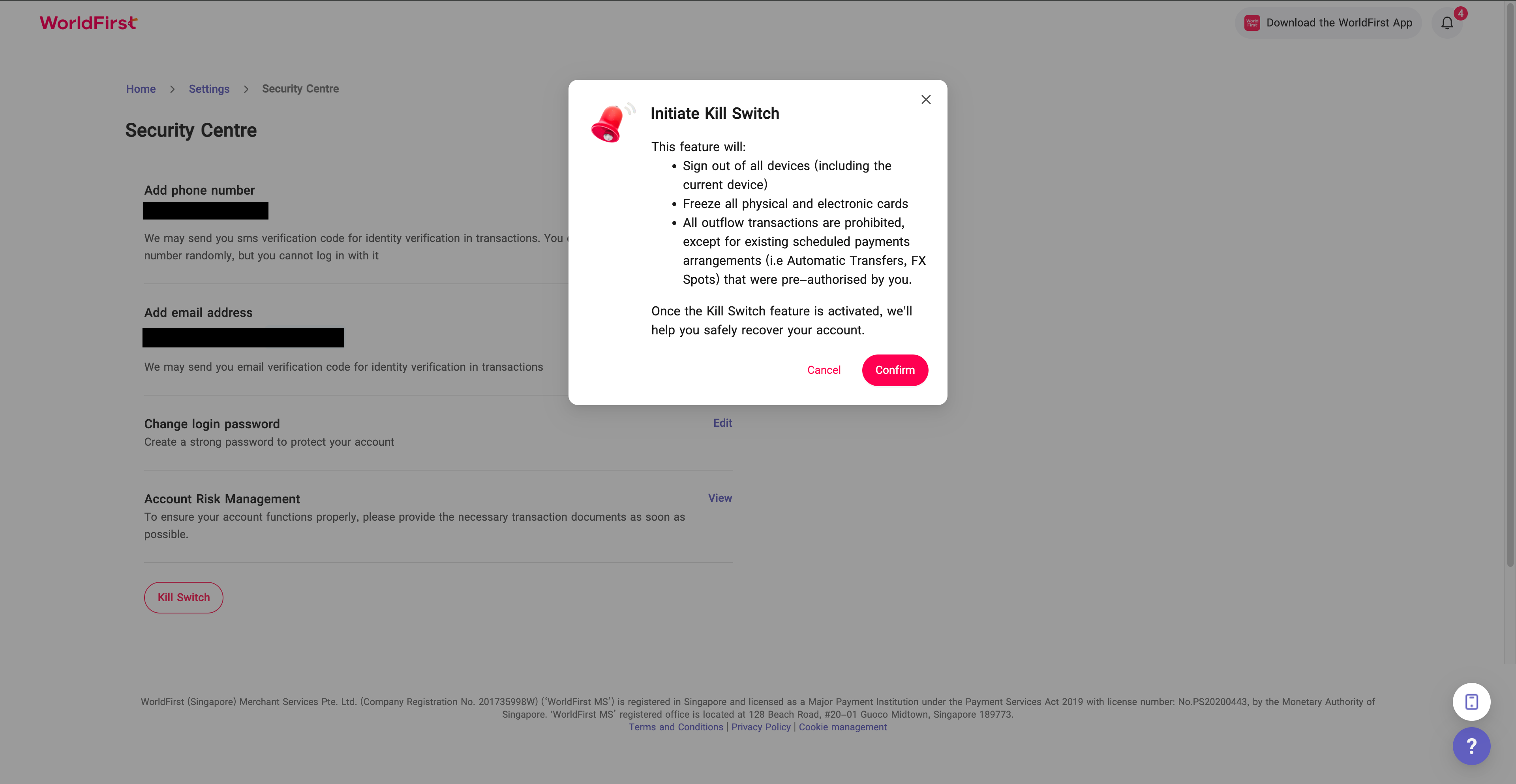
- Sign out of all devices (including the current device)
- Freeze all physical and electronic cards
- Block all outgoing transactions, except for existing scheduled payments arrangements (i.e Automatic Transfers, FX Spots) that were pre-authorised by you
Please note that the activation of Kill Switch for your account does not, by default, block incoming funds transfers or existing scheduled payments arrangements (i.e Automatic Transfers, FX Spots) that were pre-authorised by you. If you wish to extend the deactivation to these functionalities, you can request by contacting our team via email [email protected] or hotline +65 6805 4380 (Monday – Thursday 9am – 6pm SGT, Friday: 9am – 5pm SGT).
How to enable the Kill Switch?
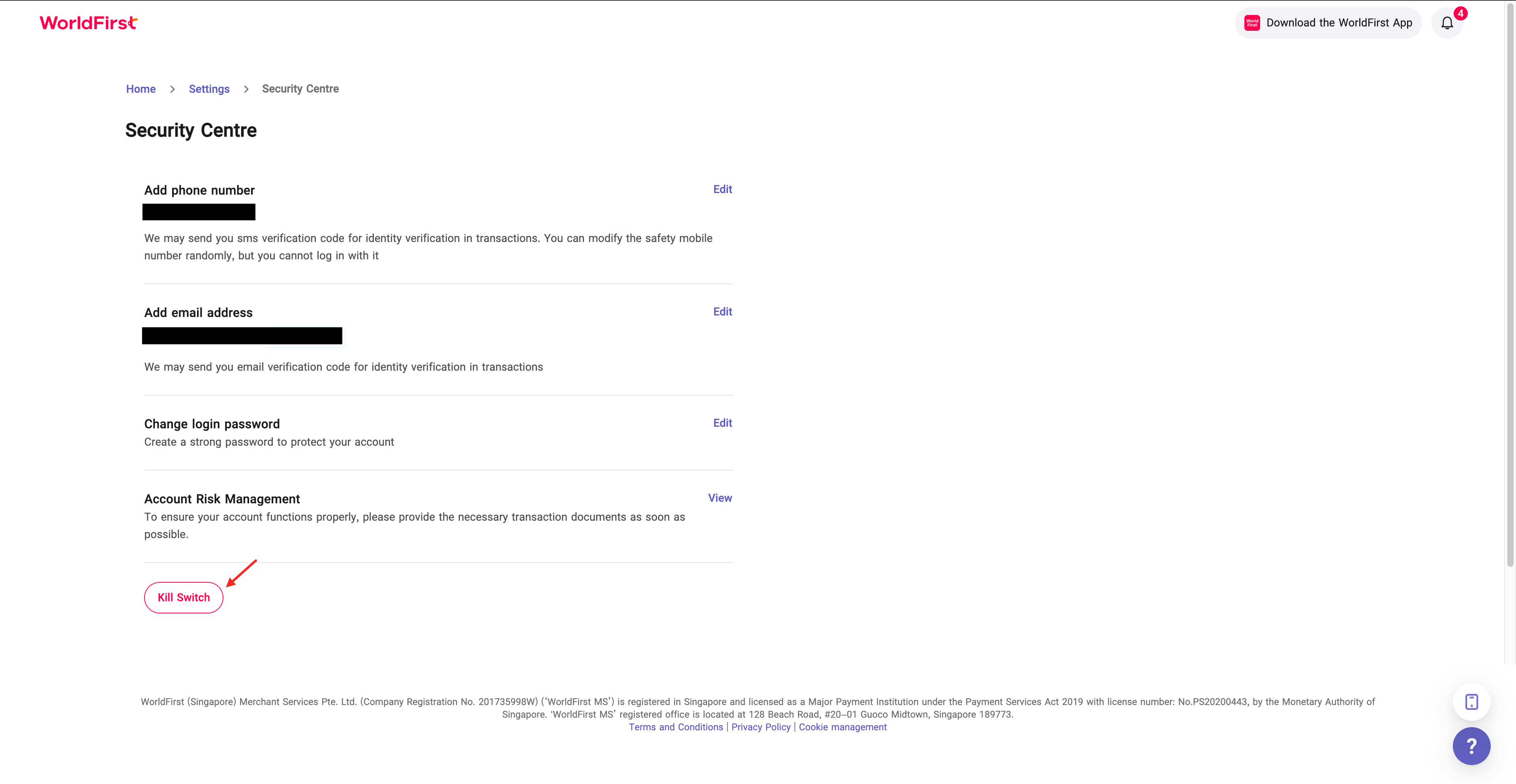
- In your World Account dashboard, go to the “Settings” tab. Then click on “Security Centre”, click on “Kill Switch”
- A pop-up notification will appear, prompting you to confirm the deactivation of your World Account.
- After you press “Confirm”, an OTP (One-Time Password) will appear for verification purposes. Once the verification is complete, you will be automatically logged out of the portal.
- You will receive an SMS and/or email once the Kill Switch has been successfully activated.
How to reactivate my World Account?
- To reactivate your World Account, please call customer service at +65 6805 4308 (Monday – Thursday 9am – 6pm SGT, Friday: 9am – 5pm SGT) or send an email to [email protected] to contact customer support.
- For security reasons, verification will be required before your World Account can be reactivated.
- Once your World Account is reactivated, the associated World Card(s) will also be reactivated automatically.
Frequently Asked Questions
1. What is the Kill Switch?
Kill Switch is a security feature that allows you to immediately suspend access to your World Account and/or World Card and certain payment transactions if you are a victim of scam or suspect your World Account and/or World Card(s) have been compromised.
2. When should you enable the Kill Switch?
Activate the Kill Switch immediately if you:
- Suspect your device has been compromised or lost;
- Notice unauthorised transactions in your World Account and/or World Card;
- Believe your login credentials have been compromised;
- Receive suspicious OTPs or verification messages;
- Suspect any form of account takeover or fraud.
3. What information do you need to prepare to activate the Kill Switch?
You will need access to your registered security mobile phone number to receive the one-time password (OTP) for verification before activation of Kill Switch.
4. What happens when Kill Switch is activated?
When activated, the Kill Switch will:
- Sign out of all devices (including the current device)
- Freeze all physical and electronic cards
- Block all outgoing transactions, except for existing scheduled payments arrangements (i.e Automatic Transfers, FX Spots) that were pre-authorised by you
Note: Incoming funds transfers or existing scheduled payments arrangements (i.e Automatic Transfers, FX Spots) that were pre-authorised by you will not be blocked when Kill Switch is activated.
5. How will I know if the Kill Switch activation is successful?
You will receive an SMS and/or email to confirm that Kill Switch has been activated. If you did not receive a confirmation SMS and/or email, Kill Switch may not have been activated and your World Account, World Card(s) and the account access may not have been blocked. If so, please call our customer service hotline for immediate assistance.
6. How long does the Kill Switch remain active?
The Kill Switch will remain active until you specifically request to deactivate it after completing our security verification process. This ensures your account remains protected while we investigate any potential threats.
We encourage you to make alternative arrangements for any urgent transactions.
7. Will incoming transfers into the account be suspended when Kill Switch is activated?
No, incoming funds transfers will still be processed when Kill Switch is activated. To block incoming funds, please contact our team for assistance.
8. Will World Card transactions be suspended when Kill Switch is activated?
Yes. Upon enabling the emergency deactivation, your World Card(s) will be frozen and and payments made using the World Card(s) will fail.
9. How do I unblock Kill Switch?
You will need to contact our team via [email protected]. Our team will verify your identity and assess whether your account is secure before they proceed to reactivate your World Account and World Card access.
10. I have multiple World Cards. Will all my cards be frozen when Kill Switch is activated?
All World Cards associated to your deactivated World Account will be frozen.
11. What are the transactions that will not be processed?
While Kill Switch is active, you will not be able to make any fund transfers.