





























Learn how to set up and optimise a WooCommerce store in Australia and New Zealand effortlessly.
Key takeaways
- WooCommerce is a free, flexible e-commerce plugin for WordPress, giving businesses full control over their online store
- Unlike Shopify, WooCommerce has no platform fees but requires separate hosting and paid add-ons for advanced features
- Businesses in Australia and New Zealand can integrate local payment gateways, tax settings, and shipping providers like Australia Post and NZ Post
- WooCommerce supports multi-currency payments through plugins like WooPayments, helping businesses expand internationally.
- Optimising product pages for SEO, configuring secure payments, and leveraging marketing integrations are key to WooCommerce store success
Setting up an online store comes with many decisions: choosing a platform, managing payments, handling taxes, and more. WooCommerce is a popular choice among AU and NZ online sellers, with over 84,000+ businesses in Australia using it to power their stores.
But setting up a WooCommerce store can feel overwhelming—where do you even start? This guide simplifies the process, helping you set up and optimise your store for success in Australia and New Zealand.
What is WooCommerce?
WooCommerce is a free plugin that turns any WordPress website into an online store. It’s one of the most popular e-commerce solutions because it’s flexible, easy to use, and works with thousands of themes and plugins.
With WooCommerce, you can sell physical products, digital downloads, or even services. It comes with essential features online sellers need, including shopping carts, secure payments, shipping options, and tax calculations. You also get full control over your store’s design, pricing, and customer experience.
Key benefits of WooCommerce for Australian and Kiwi businesses
WooCommerce offers several key benefits for businesses in Australia and New Zealand:
No platform fees
Every year, small businesses in Australia spend $2 million on SaaS licenses. It’s possible you’re already spending too much on SaaS and don’t have the budget for another one. Unlike platforms like Shopify, WooCommerce doesn’t charge any platform fee for its basic setup. Instead, you’re charged for advanced features like setting up subscriptions or allowing customers to book appointments.
Control over store customisation
Another great thing about WooCommerce is that it gives you store customisation options. You can change themes, add basic features, and adjust settings. Many free themes and plugins are available to enhance your store. But, not everything is free. If you need advanced customization options or premium design elements, you’ll have to pay.
Scalable and integrates with marketing tools
WooCommerce is scalable, allowing you to add features and expand its functionality as your business grows. It integrates with email marketing platforms like Mailchimp, automation tools like Zapier, and ad platforms like Google Ads and Facebook Ads. If you’re selling globally, WooCommerce has multi-currency payment options, tax calculators, and shipping integrations to make international transactions seamless.
WooCommerce vs Shopify: A quick comparison
Choosing between WooCommerce and Shopify depends on your business needs. WooCommerce is an open-source plugin for WordPress that gives you complete control over your store’s design, features, and pricing. It’s free to install, and you only pay for extras like hosting premium themes or advanced plugins. And of course, you’ll also be paying to host your website on WordPress. This makes it a great choice for businesses already inclined towards using WordPress hosting and want scalability without ongoing platform fees.
Shopify, on the other hand, is an all-in-one e-commerce platform with a monthly subscription. It’s beginner-friendly, offering built-in hosting, security, and customer support, making it ideal for those who want a hassle-free setup. However, Shopify’s pricing can add up with monthly fees, transaction charges, and paid apps.
WooCommerce fees: What’s the cost of building a WooCommerce store?
WooCommerce fees depend on what features you want. But for the most part, basic features are free and you have to pay for the advanced ones. Here’s a breakdown of the cost of building a WooCommerce store:
Themes
- Free themes: WooCommerce offers a variety of free themes that can give your store a professional look without additional costs.
- Premium themes: If you’re seeking more advanced features or unique designs, premium themes are also available at fixed annual fees.
Plugins and extensions
- Essential plugins: While WooCommerce provides core functionalities, you might need additional plugins for enhanced features like SEO, security, or marketing. Some essential plugins are free, while others may come at a cost.
- Advanced extensions: Features such as product recommendations, bookings, or subscriptions require premium extensions.
Payment processing fee
- WooPayments: WooPayments has no setup charge and no monthly fees. But you may have to pay an extra fee when credit or debit cards are used for payments.
- Alternative payment gateways: Other options like PayPal or Stripe have their own fee structure. It’s advisable to check their official websites for the most current rates.
Developer fees
If you require custom features or design tweaks, hiring a developer might be necessary. Developer rates can vary significantly, depending on expertise and project complexity.
Before setting up a WooCommerce store
Before launching your WooCommerce store, there are a few essential steps to ensure you have a strong foundation. Here’s what you need to get started:
Domain name and hosting
Your domain name is your store’s online address, while hosting ensures your website stays accessible and runs smoothly. For a WooCommerce store, choose WordPress-compatible hosting that offers speed, security, and scalability.
Look for local servers or CDN support to improve performance for Australian and NZ customers. Keep your domain name short, relevant, and easy to remember, and if targeting local markets, opt for a .com.au or .nz domain.
WordPress installation
Once your hosting is set up, you need to install WordPress, since WooCommerce is a WordPress plugin. Many hosting providers offer one-click WordPress installation, making it easy to start.
Steps to install WordPress:
- Log into your hosting account
- Find the ‘One-Click Install’ option for WordPress
- Choose your domain name and follow the setup instructions
- Once installed, log in to your WordPress dashboard
After this, you can install WooCommerce by searching for it in the Plugins section of WordPress and clicking ‘Install & Activate.’
SSL certificate
An SSL certificate encrypts data between your website and customers, ensuring secure transactions. Without SSL, browsers will show a “Not Secure” warning when customers try to visit your website, which can turn many away.
If your store accepts online payments, a paid SSL is recommended for extra security and credibility.
How to install WooCommerce on your WordPress site?
Installing WooCommerce on your WordPress site comes with a few steps, here are those:
Installing WooCommerce
- Log into WordPress: Go to the WordPress dashboard and enter your login details
- Go to plugins: In the WordPress dashboard, navigate to Plugins > Add New
- Search for WooCommerce: Type ‘WooCommerce’ in the search bar and click Install Now on the official WooCommerce plugin
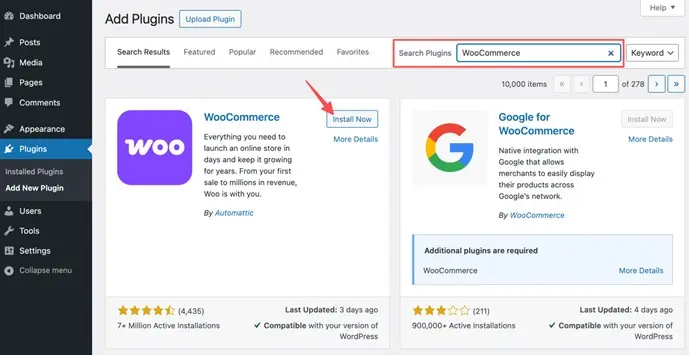
- Activate the plugin: Once installed, click Activate, and WooCommerce will be ready to set up
Running the WooCommerce setup wizard
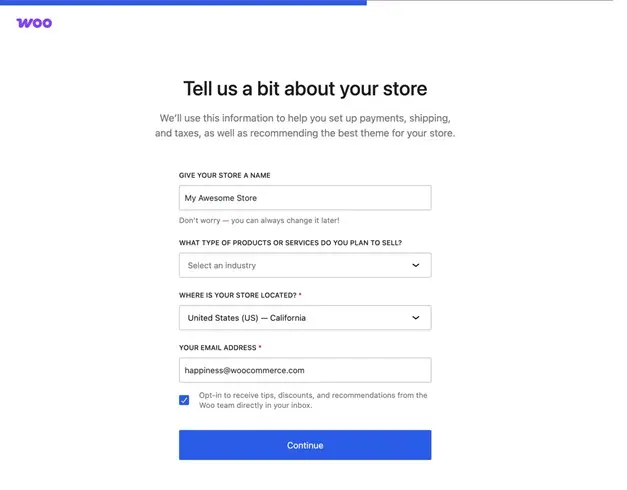
After activation, WooCommerce launches its setup wizard to guide you through the essential settings:
- Store details: Enter your business location, industry, and whether you’re selling physical or digital products
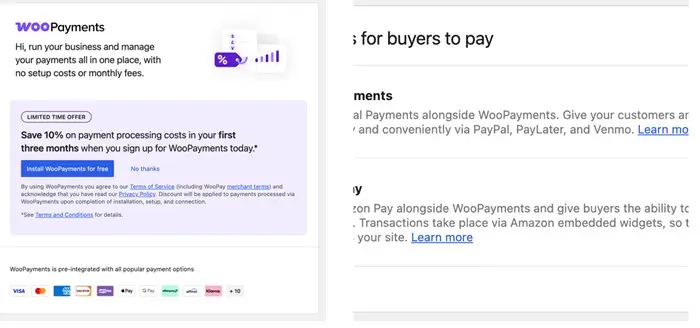
- Payment setup: Choose payment methods like WooPayments, PayPal, Stripe, or manual bank transfer
- Shipping settings: Define your shipping zones and select flat rate, free shipping, or live rates
- Recommended plugins: WooCommerce suggests useful extensions, but you can skip this if you prefer
Configuring store location, currency, and tax settings
To tailor WooCommerce for Australian or NZ businesses:
- Store location: Set your store’s base country to Australia or New Zealand
- Currency: Select Australian Dollar (AUD) or New Zealand Dollar (NZD) under WooCommerce > Settings > General
- Taxes: Enable tax settings to calculate GST (Australia) or GST/VAT (New Zealand)
Adding business details
During setup, WooCommerce asks about your business type:
- Physical products: For businesses selling tangible goods that require shipping
- Digital products: If you’re selling downloadable files like e-books, software, or courses
- Industry selection: Choose your industry to help WooCommerce suggest relevant features and extensions
Set up multi-currency payment collections
WooCommerce doesn’t support multi-currency payments by default, but plugins like WooPayments or third-party gateways such as Stripe or PayPal let you accept payments in over 100 currencies.
To reduce conversion fees, platforms like WooPayments allow sellers in eligible countries to receive payouts in multiple deposit currencies. However, this usually requires opening local bank accounts in each currency region—a process that’s often complex and time-consuming.
A simpler alternative is to use a multi-currency business account. These accounts let you set up virtual local currency accounts in major currencies like USD, EUR, GBP, and more, complete with local bank details ( account number and bank code)—all without needing a local address.
You can send, receive, and hold funds in multiple currencies, which helps you operate like a local, avoid double conversions, and benefit from more competitive exchange rates on international transactions.
How WorldFirst can help streamline your WooCommerce payments
WorldFirst supports the global business expansion of fast-growing companies through its World Account, a multi-currency account that lets you open local currency accounts in 15+ currencies. This allows you to collect payments in your customers’ preferred currencies and repatriate the funds back to your bank account at favourable exchange rates when ready.
You can also use the funds to pay suppliers, shipping partners, tax authorities, and agencies—all without unnecessary conversion to your default currency.
Setting up World Account with WooCommerce
If you’re using WooPayments, you can link your World Account receiving accounts to accept payouts in multiple currencies. Here’s how:
Step 1: Set up the Receiving Account
- On your World Account dashboard, go to the “Collection” tab.
- Click on “Manage Accounts” > “Add a New Receiving Account” and select the currency for your Receiving Account.
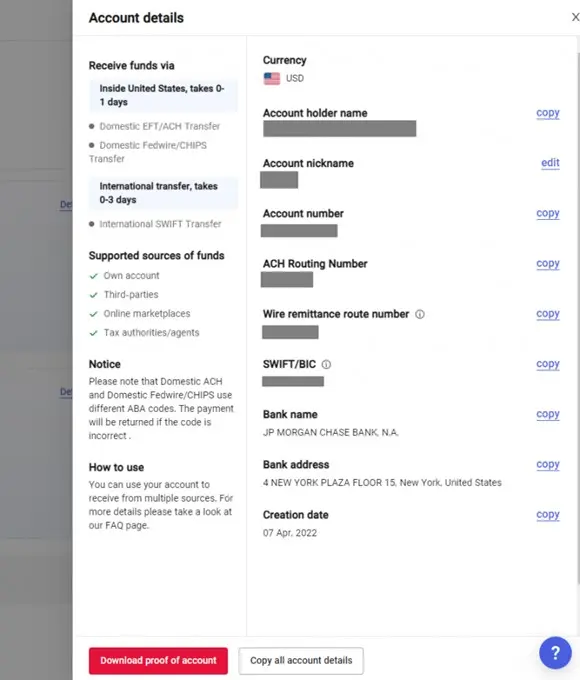
- Once the account is set up, click on “Details” to get the account information.
Step 2: Link your Receiving Account to WooCommerce
- Go to your WordPress dashboard.
- Navigate to “Payments” > “Overview”.
- Click on “Account Details”, then “Edit details”.
- You’ll be redirected to connect.stripe.com to log in.
- Enter the 6-digit code sent to your phone number.
- In the Stripe Express dashboard, click on the person icon in the upper-right corner.
- In the “Payout Details” section, click on your store name (you may see multiple stores listed here).
- Click on the pencil icon next to your bank account or debit card to edit or replace the information.
- Click “Save” once you’re done. Your new payout method will be shown.
Step 3: Add additional accounts for Multiple Deposit Currencies
- Click on “Add an account” to add another bank account for a different currency.
- Fill out the bank account information and click “Save” at the bottom.
- Both bank accounts will now be displayed along with their respective currencies.
- Click “Done” to complete the process.
By integrating WorldFirst’s World Account with WooCommerce, you can efficiently manage payments across multiple currencies while reducing unnecessary conversion fees, making it easier to scale your business internationally.
Shipping and delivery options
For Australian and NZ businesses, WooCommerce integrates with major carriers like Australia Post, NZ Post, and Sendle to provide real-time shipping rates at checkout. You can set up:
- Flat-rate shipping for standard delivery within Australia and NZ
- Free shipping for orders above a certain amount to boost sales
- Real-time shipping rates by connecting WooCommerce to your preferred courier service, ensuring customers pay the exact shipping cost
Adding products to your WooCommerce store
When adding products, you need to set up the right product type, optimise images and descriptions, configure pricing and taxes, and manage inventory. Here’s how to do it efficiently:
Choosing the right product type
WooCommerce supports different product types:
- Simple product: A single item with no variations (e.g., a book)
- Variable product: Items with options like size or colour. Create attributes and assign variations
- Grouped product: A collection of related products sold together (e.g., a skincare set)
To add a product, go to Products > Add New, enter the details, and publish.
Optimising images and descriptions for SEO
- Use high-quality images (at least 800px x 800px) and compress them for faster loading
- Write clear, keyword-rich descriptions that include terms your customers might search for
- Fill in SEO details, such as alt text and meta descriptions, to improve visibility on Google
Managing stock & inventory
- Enable stock tracking under WooCommerce > Settings > Products > Inventory
- Set stock quantities and low stock notifications to prevent overselling
- Allow or disable backorders based on your supply chain
Optimising your WooCommerce store for SEO and growth
Here are some strategies to optimise your WooCommerce store:
Conduct thorough keyword research
Before writing product titles and descriptions, find out what your customers are searching for. If you sell running shoes, for example, do people search for “men’s running shoes” or “best running shoes for beginners”? Tools like Google Keyword Planner can help you discover what words to use. Adding these keywords naturally in your product descriptions and meta tags makes it easier for search engines to rank your store.
Optimise your product pages
Your product pages need more than just a title and price. Add detailed descriptions that explain the benefits of your product, not just the features. Use high-quality images with proper file names and add alt text so Google knows what’s in the image.
Make it easy to navigate
Customers (and search engines) prefer well-organised stores. Use clear categories and subcategories so products are easy to find. Instead of dumping all shoes under one category, separate them into “Running Shoes,” “Casual Shoes,” and “Formal Shoes.” Adding breadcrumb navigation (e.g., Home > Men’s Shoes > Running Shoes) also helps Google understand your store’s structure.
Grow your e-commerce business
WooCommerce gives Australian and NZ businesses flexibility, cost savings, and full control over their online stores. With multi-currency support, local shipping integrations, and dropshipping options, it’s a great platform for scaling your e-commerce business.
Before launching, ensure you’ve:
- Chosen a reliable host and secured your domain
- Installed WooCommerce and configured payments, taxes, and shipping
- Optimise your product pages for SEO and conversions
For extra support, check out WooCommerce Docs, join online forums like the WooCommerce Community, or hire local developers for custom solutions. With the right setup, your WooCommerce store can grow in the Australian and NZ markets.
Disclaimer: The information contained is general only and largely our views. Before acting on the information you should consider whether it is appropriate for you, in light of your objectives, financial situation or needs. Although information has been obtained from and is based upon multiple sources the author believes to be reliable, we do not guarantee its accuracy and it may be incomplete or condensed. All opinions, estimates, mentioned products/services and referenced material constitute the author’s own judgement as of the date of the briefing and are subject to change without notice. WorldFirst shall not be responsible for any losses or damages arising from your reliance of such information.