Your supplier has finished the order, but the shipment won’t move until the funds are cleared. Changed beneficiary details, a currency mismatch or a late transfer can delay its release and push back the delivery date.
Malaysia imported a record RM1.455 trillion of goods in 2025, up 6.2% from the previous year, according to MATRADE. For established importers, repeat orders mean more invoices, currency conversions and approvals to coordinate without disrupting supply schedules.
This guide explains how Malaysian SMEs can build a more controlled process for international supplier payments, from invoice approval through to reconciliation.
Key takeaways:
- Verify every payment before funds move: Match the invoice to the purchase order, confirm the payment stage and verify any new or changed beneficiary details through a trusted contact method
- Compare the full MYR cost, not just the quoted price: Check the FX rate, payment charges, possible bank deductions and expected supplier receipt when comparing USD, CNH or other currency options
- Plan from the supplier’s receipt deadline: Work backwards from when cleared funds are required, allowing time for funding, conversion, internal approval, banking calendars and payment processing
- Reconcile the payment before closing the invoice: Track the transfer until completion, confirm the amount and currency received, then match the payment to the correct invoice, order and accounting record
- Manage repeat supplier payments through one workflow: A World Account can combine supported currency balances, payment approvals and transaction records in one place
Open a World Account to manage international supplier payments with visibility across currencies, suppliers and due dates.
How international supplier payments fit into the wider order cycle
International supplier payments often determine when an order moves from one commercial milestone to the next. A deposit may secure production capacity, a staged payment may follow quality checks, and the balance may become due once the supplier meets the agreed delivery terms.
For Malaysian importers, linking each transfer to its corresponding order milestone makes it easier to see which commitments are due and how much MYR must be available.
What you need for international supplier payments: a checklist
For a typical payment for imported goods, prepare the commercial invoice and the purchase order or supply contract behind it.
Depending on how far the order has progressed, your bank or payment provider may also ask for transport, delivery or payment evidence.
Before finance releases the payment, complete these four checks to confirm that the documents, beneficiary details and order stage all support the transfer:
1. Check the invoice against the order
The invoice should reflect what your business approved. Before finance prepares the transfer, check:
- Supplier name: Matches the approved supplier record
- Goods and quantity: Agree with the purchase order or contract
- Amount due: Covers the correct deposit, staged payment or final balance
- Currency: Matches the accepted quotation
- Payment terms: Follow the agreed due date or order milestone
- Invoice reference: Identifies the payment clearly for both businesses
Resolve any unexplained difference before funds move. A revised amount, currency or payment stage should appear in the approved commercial records, not only in a supplier email.
2. Verify the beneficiary details
Supporting documents show why the payment is due. Beneficiary details determine where the money goes.
The information required depends on the supplier’s country and receiving currency, but it may include:
- Account holder name and supplier address
- Account number or IBAN
- SWIFT, BIC or local routing code
- Bank name and country
- Payment purpose and invoice reference
A mismatch between the invoice, supplier name and bank account can delay the transfer or trigger further checks. Confirm new or amended details through a contact method already held in your records, rather than using the same contact info from the person that requested the change.
3. Match the evidence to the payment stage
A deposit may rely on the approved invoice, order and contract. Once the goods have shipped, transport or delivery evidence may also support the final balance.
Malaysian bank guidance lists these as examples of supporting documents that may be requested for an international supplier payment, rather than a fixed set required for every transaction.
Provide the documents that reflect the goods’ production, shipment or delivery stage when the bank or payment provider asks for them.
4. Separate payment records from customs documents
Payment checks confirm the reason for the transfer and the account receiving it. Customs records support the import declaration, clearance and any tariff treatment claimed.
Keep the beneficiary verification, internal approval and payment confirmation alongside the commercial records supporting the transfer.
For a preferential tariff claim, Royal Malaysian Customs states that an importer may need:
- Customs Form No. 1
- Proof of origin
- Invoice
- Bill of lading
- Packing list
These records support the customs claim rather than the supplier transfer itself.
Use the same invoice or purchase-order reference across both record sets so finance and import records remain easy to trace.
How to choose the right currency for supplier payments
Choose the currency that gives you the clearest total MYR cost and matches the account your supplier has approved for payment.
1. Confirm the invoice and account currencies match
Start with the currency on the approved invoice, then confirm that the supplier’s bank account accepts it without an automatic conversion.
A supplier may use separate accounts for USD, CNH, EUR or another currency. Sending funds to an account set up for a different currency could lead to rejection, conversion by the receiving bank or a lower amount reaching the supplier.
Confirm three points:
- Invoice currency
- Currency accepted by the receiving account
- Bank account assigned to that currency
2. Compare the full MYR cost of each quotation
Many overseas suppliers quote Malaysian importers in USD even when their own costs sit in another currency. A Chinese manufacturer, for example, may offer one price in USD and another in CNH.
Ask for both quotations at the same time, then compare:
- MYR required: The ringgit needed to fund each option
- FX rate and margin: The cost of converting MYR
- Payment fees: Charges included in the transfer
- Bank deductions: Possible intermediary or recipient-bank fees
- Quote validity: How long each price remains available
- Expected receipt: The amount the supplier expects after deductions
A USD quote may include an allowance for the supplier’s conversion costs. Paying in CNH could remove that element, but it doesn’t automatically make the local-currency quote cheaper.
Compare both quotations under the same market conditions. The better choice is the one with the more suitable all-in MYR cost and a clear recipient amount.
3. Decide who carries any payment charges
Confirm who covers any difference between the invoice and the amount credited to the supplier.
Agree three points:
- Full amount the supplier must receive
- Bank charges that may reduce the credited amount
- Party responsible for any shortfall
Record the arrangement in the purchase order, contract or payment terms. Both sides should know how much leaves your account and how much the supplier expects to receive.
Read more: How to pay international suppliers in USD, CNH and EUR
How to make international supplier payments through a multi-currency account
Once you agree on the invoice currency, a multi-currency account gives you one place to convert funds and pay the verified supplier.
WorldFirst supports payments in 100+ currencies to 210+ countries and territories. Availability depends on the currency, destination and your account.
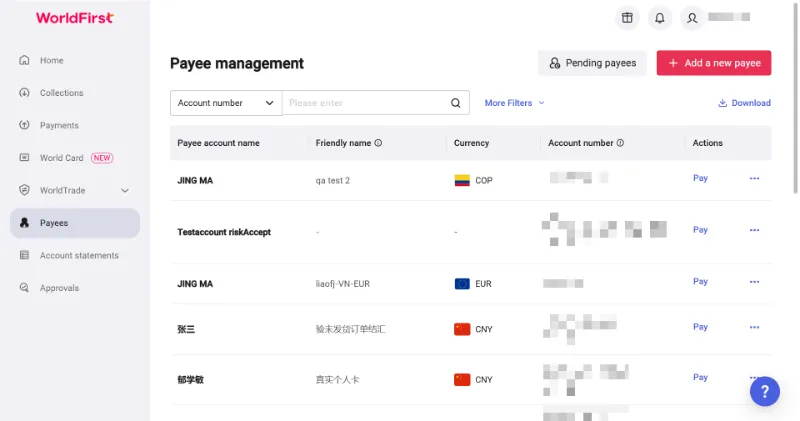
1. Add the supplier as a payee
Select the beneficiary country and payment currency, then enter the supplier details already verified during the document checks.
WorldFirst may approve the payee immediately or request further information or supporting documents.
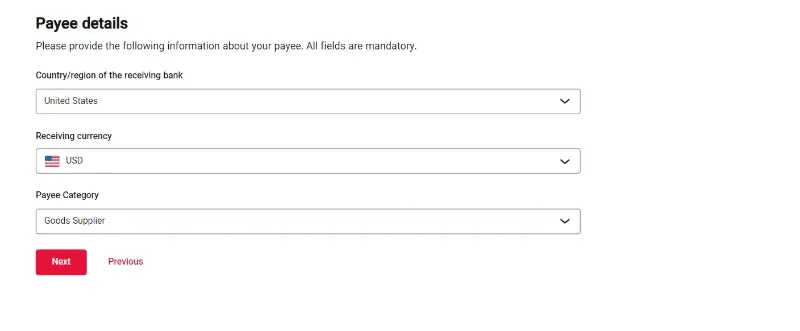
2. Fund and convert the payment
You can top up the World Account from an external bank account held in the same name or use funds already available in a supported balance.
WorldFirst may ask you to verify the external account before funding it.
Choose the route that matches where your funds are held:
- Fund from MYR: Convert ringgit into the invoice currency
- Use an existing balance: Pay from funds already held in that currency
- Convert another balance: Exchange a supported currency into the required one
For a spot conversion, select the currencies, amount and settlement date. The converted funds can move into the relevant World Account balance or link directly to the supplier payee.
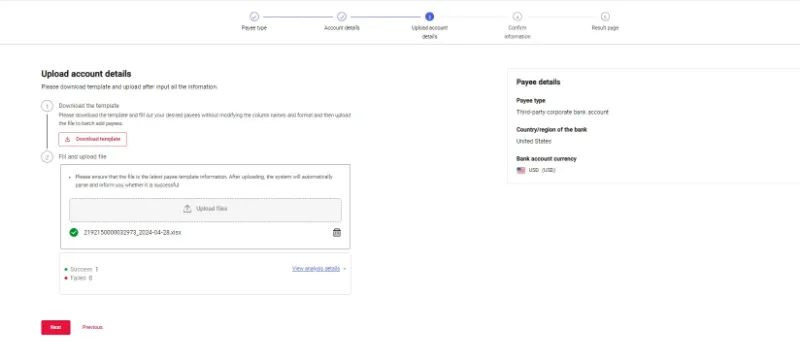
3. Apply your payment approval rules
WorldFirst lets account holders assign team roles, set permissions and create payment-authorisation rules based on who can process or approve a payment, its destination and the amount.
Those controls may include:
- Additional approval above a set amount
- Separate review for a new payee
- Restricted payment access for selected users
The approver should still check the supporting invoice before releasing the payment.
4. Review and submit the payment
Before confirmation, check:
- Payee and receiving account
- Amount and currency
- Invoice or purchase-order reference
WorldFirst provides payment tracking, account reporting and downloadable statements for incoming and outgoing transactions.
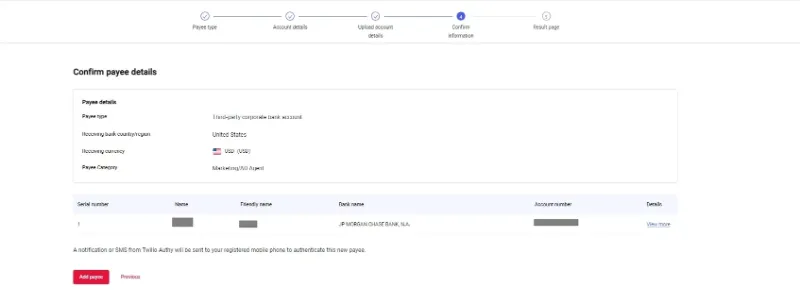
Where supported, you can send the payment immediately or choose a future execution date.
Read more:
When should you convert and send a supplier payment?
Work backwards from the date your supplier needs cleared funds, then set the conversion and transfer dates around that deadline.
1. Start with the supplier’s receipt date
The invoice due date is typically the day the supplier expects to receive the money, not the day you should submit the transfer.
Allow time for funding, conversion, final approval and processing, and any extra checks requested by the bank or payment provider.
Payment times vary by currency, destination and banking route. Use the estimate for the specific transfer rather than applying one timeframe to every supplier.
2. Choose when to convert MYR
Converting after invoice approval gives you earlier visibility over the final MYR cost. Converting in stages spreads a larger currency requirement across several dates. Waiting until closer to payment keeps funds in MYR for longer but leaves the final cost exposed to exchange-rate movements.
Base the decision on the supplier deadline, available cash and approved MYR amount rather than trying to predict the market.
3. Check both banking calendars
A working day in Malaysia may be a public holiday where your supplier banks. Time-zone differences and bank processing deadlines can also move a late submission into the next business day.
Check the banking calendars in both countries before confirming the transfer date. Submit the payment earlier when a weekend or public holiday falls before the required receipt date, as banks may not process it on those days.
4. Allow for the time between sending and arrival
A future-dated payment can support a known supplier deadline, but the scheduled date usually refers to when the transfer is released, not when the supplier receives it.
Make sure the account is funded on that date and allow time for processing afterwards.
How to track and reconcile an international supplier payment
Use these four steps to confirm receipt and reconcile the payment in your records:
- Track the payment status: Follow the transfer until it shows as completed rather than relying only on the submission confirmation
- Confirm receipt with the supplier: Check the date, currency and amount credited against the payment record
- Match the transfer to the invoice: Record the payment against the correct invoice, purchase order and payment stage
- Resolve any difference: Investigate short receipts, returns or unmatched references before marking the invoice as paid
A complete payment record gives finance a reliable reference for the next supplier order and supports a consistent process for repeat payments.
Read more: How to make fast and instant international money transfers
Fund repeat supplier payments from international revenue with WorldFirst
For importers that also sell overseas, supplier payments become harder to coordinate when revenue arrives in one currency, but upcoming costs fall due in several others.
With a World Account, eligible Malaysian businesses can receive and hold supported currencies, use those balances for supplier payments and convert the amount needed for local costs.
Say you run a Kuala Lumpur electronics importing business and receive a US$45,000 payment from an overseas customer or marketplace. Over the next two weeks, you need to pay a US$11,000 freight invoice, settle a CNH96,000 balance for a repeat order from a Shenzhen supplier and cover customs charges, warehousing and payroll in MYR.
When a MYR-only account receives the full payment, it may convert into ringgit before those costs become due. The business then needs to buy US dollars again for the freight invoice and convert another portion into CNH for the supplier payment.
When the payment reaches the USD balance of a World Account, you can retain US$11,000 for the freight invoice, convert only the amount required for the CNH96,000 supplier balance and move the remainder into MYR for local costs. That payment flow avoids routing the full incoming amount through MYR before the business meets its USD and CNH commitments.
WorldFirst isn’t a bank. Ant International has received approval from Bank Negara Malaysia to operate WorldFirst in Malaysia under a Class A Money Services Business licence. WorldFirst provides cross-border payment and multi-currency account services for businesses.
Open a World Account to put international revenue towards upcoming supplier payments.
FAQs
1. Can I cancel an international supplier payment after sending it?
Sometimes. You may cancel an eligible scheduled payment before its execution deadline. Once the payment has been sent, you can only request a recall, and recovery isn’t guaranteed.
2. What happens if an overseas supplier payment is returned?
The funds are sent back to the originating account, although bank charges or exchange-rate differences may affect the returned amount. Determine why the payment was rejected and correct the issue before trying again.
3. Can I split one supplier invoice across multiple payments?
Yes, if the supplier agrees and the payment terms record each instalment. Include the invoice reference and payment stage on every transfer.
4. When should I use a letter of credit instead of a bank transfer?
Consider a letter of credit for a large order, a new supplier relationship or a transaction that needs bank-backed payment assurance against specified documents. A bank transfer is usually simpler for an established supplier relationship.
5. Do Malaysian businesses pay withholding tax on overseas supplier payments?
Usually not when paying only for imported goods. Withholding tax may apply when the payment includes interest, royalties, certain services or work performed by a non-resident contractor. Tax treatment depends on the invoice components and transaction circumstances, so seek professional tax advice where necessary.
Disclaimer:
This article is intended for general informational purposes only and does not constitute legal or professional advice. WorldFirst makes no representations or warranties regarding the accuracy, completeness or applicability of the content and readers are encouraged to consult with legal professionals or other professionals for advice tailored to their specific situation. WorldFirst does not guarantee the accuracy and completeness of this article and expressly disclaims any and all liability to any person in respect of the consequences of anything done or omitted to be done wholly or partly in reliance on this article.
Sources:
- https://www.matrade.gov.my/en/about-matrade/press-release/malaysias-trade-performance-for-2025
- https://www.customs.gov.my/en
- https://www.customs.gov.my/en/business/facilitation/rules-of-origin-roo/faq-rules-of-origin