If you sell through marketplaces and plan to add your own online store, you’ll need an international payment gateway to accept customer payments at checkout.
According to the Malaysia Competition Commission’s 2025 marketplace report, marketplaces can take two to seven working days to credit merchant earnings. Fees, payout timing and currency conversion can affect how much reaches you and when those funds become available for business costs.
This article explains how an international payment gateway fits into your wider payment flow, what to consider when choosing one and how a multi-currency account can support sales proceeds after payout.
Key takeaways:
- Marketplace sellers may not need their own gateway: Marketplaces usually handle checkout, so sellers only need a separate gateway for direct sales through their own store
- Checkout and payout are separate: The gateway handles the customer payment, while the marketplace or provider later sends the seller’s proceeds
- Gateway choice depends on more than payment methods: Sellers should also assess platform compatibility, payout currencies, settlement terms and reporting
- The headline processing rate doesn’t show the full cost: Fixed charges, cross-border fees, currency conversion, refunds and chargebacks can all reduce the final payout
- WorldFirst supports the flow after checkout: A World Account can receive supported marketplace and payment-provider proceeds and put them towards supplier, advertising and other business payments
Open a World Account to connect supported international sales proceeds with your wider business payment flow.
What is an international payment gateway?
An international payment gateway securely sends customer payment information from your checkout to the processor and banks that approve or decline the transaction. It doesn’t hold your sales proceeds or decide when a marketplace pays you.
The gateway is one part of a wider payment flow:
| Part of the flow | Main role |
| Payment gateway | Captures, encrypts and transmits checkout information |
| Payment processor | Communicates with banks and payment networks |
| Merchant acquirer | Enables payment acceptance and settlement |
| Marketplace | May manage checkout, collection and seller payouts |
| Settlement or business account | Receives and manages the proceeds |
One provider may perform several of these roles, which is why terms such as gateway, processor and payment provider often overlap in everyday use.
For your own store, focus on two currency decisions: what the customer pays in and what the provider pays out. The two currencies may differ.
The international element refers to support for customers in different markets. Depending on the provider, that may include foreign-issued cards, several checkout currencies and local payment methods such as bank transfers or e-wallets.
How does an international payment gateway work?
An international payment starts when the customer chooses a payment method and confirms the order. From there, the transaction moves through several stages before the seller receives the proceeds:
- The customer submits the payment: The checkout collects the required details for the selected card, bank transfer, e-wallet or other supported method
- The gateway secures and routes the request: It encrypts the information and sends it to the processor
- The payment institutions assess the transaction: The relevant institutions approve or decline the request
- The institutions clear the approved payment: The transaction moves through clearing before the funds become available
- The provider releases the payout: The marketplace or gateway deducts applicable charges and transfers the remaining balance
Read more: What details are needed for a bank transfer in Malaysia
When do marketplace sellers need their own payment gateway?
A marketplace seller needs an independent payment gateway only when accepting customer payments through a store or sales channel outside the marketplace.
| Selling model | Who manages the checkout? | Do you need your own gateway? |
| Marketplace only | Marketplace | No |
| Own online store | Seller | Yes |
| Hybrid | Marketplace and seller | Only for your own store |
If you sell only through marketplaces, your main payment decisions concern the payout account, settlement currency and payout timing, not the checkout gateway.
If you run your own store, the gateway connects the checkout with the payment processor and supported payment methods. Hybrid sellers use the marketplace’s payment system for marketplace orders and a separate gateway for direct-store sales.
How to set up an international payment flow for your marketplace business
A complete payment flow links each sales channel with the currency, account and expense that follow the sale. The aim is to identify where checkout ends, when conversion occurs and how the proceeds will be used.
Step 1: Map your sales and payout flows
List every marketplace and independent store your business uses. Record the customer currency separately from the payout currency because they may differ.
The table below shows an illustrative payment flow. The currencies and account setup will depend on each sales channel and its payout rules.
| Sales channel | Checkout owner | Customer currency | Payout currency | Receiving account | Next use of funds |
| Global marketplace | Marketplace | USD | USD | USD account | Supplier and advertising costs |
| Regional marketplace | Marketplace | SGD or MYR | SGD or MYR | Matching currency account | Logistics and local costs |
| Independent store | Seller-selected provider | Several currencies | Depends on the setup | Chosen payout account | Stock and operating costs |
The map highlights automatic conversions and additional account transfers before the funds are used for their next business purpose.
Step 2: Set up checkout for your own store
If you also sell through your own online store, connect the payment setup with its e-commerce platform.
The main integration routes are:
- Hosted checkout: The provider manages the payment page, reducing setup work but limiting control over the experience
- E-commerce plugin: A ready-made connection supports platforms such as Shopify or WooCommerce, with functions determined by the plugin
- Payment link: A hosted payment page supports invoices or smaller catalogues without a complete online checkout
- API integration: A direct connection gives the business more control but requires development and ongoing maintenance
Read more:
- How to run a global e-commerce business in Malaysia
- How to expand your business into Southeast Asia’s e-commerce market
Step 3: Connect eligible payouts to a World Account
A World Account can receive eligible business proceeds in supported currencies from connected marketplaces and payment service providers. Availability depends on your business type, payment source and receiving account rules.
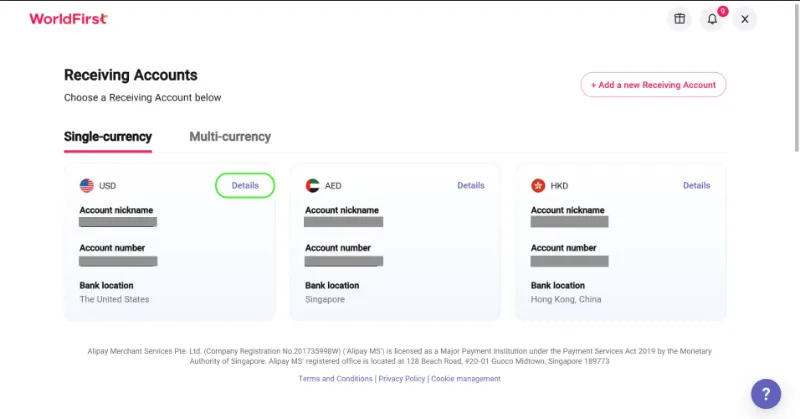
To add receiving details:
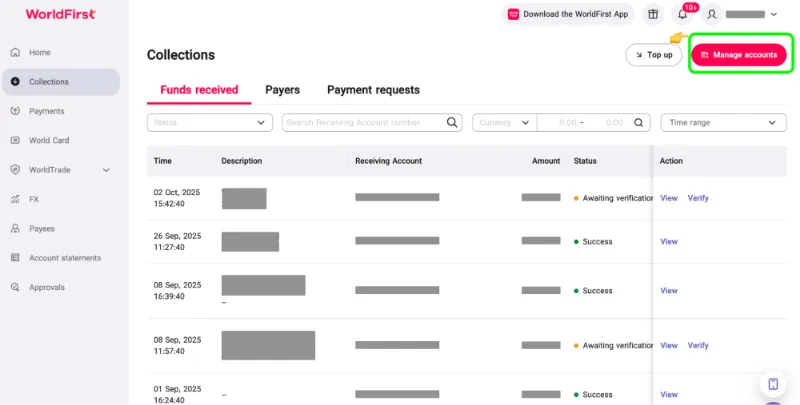
1. Open Collections and select Manage Accounts to view or create receiving accounts
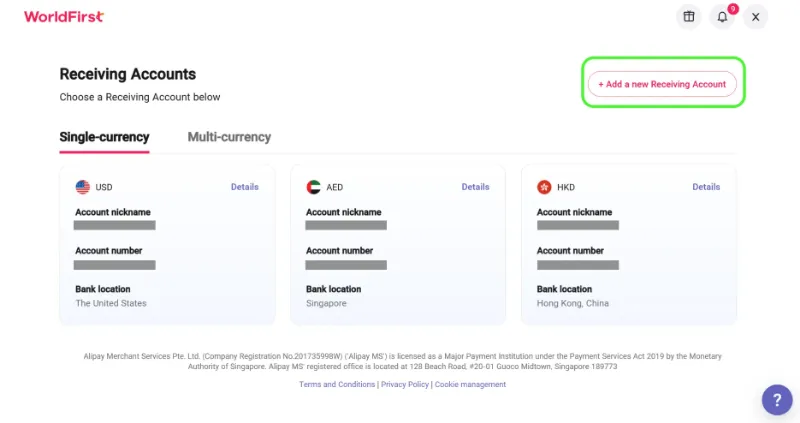
2. Select Add a New Receiving Account, then choose the required payout currency
3. Open Details once the account is ready and copy the information into the payout settings of the eligible marketplace or payment service provider
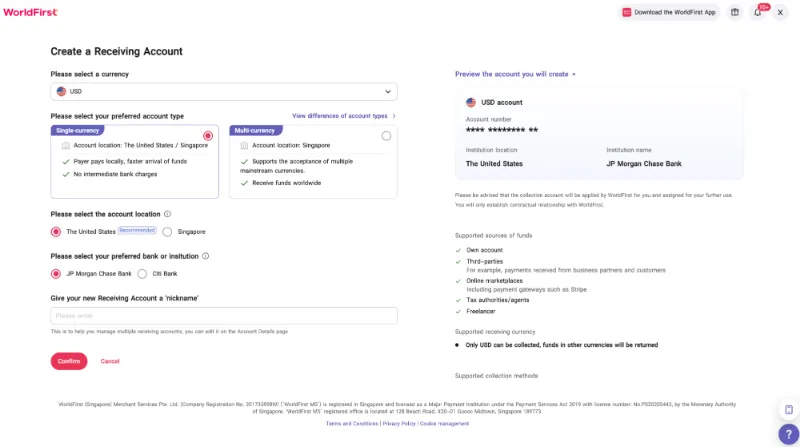
4. Confirm that the account name, currency and transfer instructions match the World Account details
Some marketplaces request proof that the receiving account belongs to the seller. Select Download proof of account from the relevant account page, enter the requested company details and generate the account verification letter.
Step 4: Decide how to use each currency balance
Upcoming expenses, cash flow needs and payment timing should guide how much you keep in the original currency and how much you convert into MYR.
Keep enough in the original currency for confirmed expenses, then convert the rest into MYR. That can reduce repeat conversions and limit unnecessary currency exposure.
Step 5: Pay suppliers and service providers
Calculate the total amount you need to send so the supplier receives the agreed invoice amount. Check who covers the intermediary and recipient bank charges, as these may reduce the amount credited.
Before sending, confirm:
- Recipient details: Account name, bank information and destination currency
- Invoice amount: The amount and currency the recipient expects
- Exchange details: The rate, charges and amount debited
- Payment reference: The invoice number or information required for reconciliation
- Charge option: Who covers intermediary or recipient-bank charges, where available
If the supplier changes their bank details, confirm the new information through a trusted contact method before sending the payment. Don’t rely only on instructions received by email.
Read more: Best way to pay overseas suppliers from Malaysia
Step 6: Test the complete flow
A successful checkout test confirms only that the customer can submit a payment. Follow one low-value transaction until you have received, recorded and used the proceeds:
- Order to settlement: Match the payment method and order value with the approval status, gross settlement amount, deducted charges and settlement currency
- Settlement to payout: Confirm the amount received, arrival date, payout reference and any conversion, refund or dispute adjustment
- Payout to business use: Match the receiving-account entry with the marketplace statement, then confirm the outgoing payment or MYR withdrawal
Every discrepancy between the original order and the usable balance should be clearly documented.
What should sellers compare when choosing a gateway for their own store?
A suitable gateway should support how customers prefer to pay and how the business receives and records the proceeds. Compare five areas before choosing a provider:
1. Payment methods in your target markets
Start with the countries where most customers are based and the payment methods they use at checkout.
An Ipsos Malaysia survey from May 2025 found that among recent non-cash payment users, 54% had used e-wallets, 50% online banking or digital transfers, 40% debit cards and 6% credit cards. These figures reflect broad payment behaviour, so sellers should also use checkout data from each target market.
If your target customers are outside Malaysia, you may need a different mix of cards, bank-based payments, digital wallets, or local payment methods.
Focus on:
- Market availability: The methods customers can use in each target country
- Currency support: The currencies available with each payment method
- Mobile experience: How easily customers can complete payments on mobile devices
- Failed payments: The alternatives offered after an unsuccessful attempt
- Refunds: How funds return through the original payment method
2. Platform compatibility
The gateway should pass the information needed to manage orders and financial records.
Confirm that it connects with the business’s e-commerce platform, accounting software and order-management tools. Identify which details transfer automatically, including transaction references, fees, refunds and payout status and which still require manual entry.
Also, establish who maintains the connection and how software updates are handled. Changes to either system may interrupt data transfers or create gaps in reporting.
3. Customer and payout currencies
List the checkout and payout currencies side by side, and prioritise currencies used by the business’s main customers and regular expenses.
Identify the conversion point, applied exchange rate or markup, cross-border charges and available payout-currency settings. These factors determine how much reaches your account and if another conversion is needed before you can use the funds.
4. Provider settlement terms
Payment providers set their own payout schedules, minimum balances and reserve rules. Compare these terms because they determine how quickly you can use the proceeds from completed sales.
Also check which events may delay a payout, including refunds, chargebacks, account checks, weekends and public holidays.
A lower processing fee may offer little value if the provider pays slowly or holds part of your balance.
5. Provider reporting and reconciliation
Payment providers include different dashboards, reports and accounting exports with their gateway service. These tools affect how easily you can match customer orders with fees, refunds and payouts.
Check that reports use consistent transaction and payout references, show charges and adjustments separately and work with your accounting process.
Clear reporting reduces manual work when one payout includes proceeds from several customer orders.
What does an international payment gateway cost?
A 2026 DHL Malaysia comparison listed card-processing fees across selected gateways from 1.5% to 5% per transaction, with some providers also charging fixed, set-up or annual fees.
The table below shows the main charges that can reduce each payout or increase the overall cost of accepting payments:
| Cost | What you should confirm |
| Processing fee | The percentage charged for each payment method, card type and customer location |
| Fixed transaction fee | The amount added to each completed payment |
| Cross-border charge | The extra cost for foreign-issued cards or overseas customers |
| Currency conversion markup | The rate or markup applied when funds change currency |
| Payout or withdrawal fee | The cost of transferring funds to the receiving account |
| Refund fee | Any retained processing fee or separate charge when money returns to a customer |
| Chargeback fee | The charge applied when a customer disputes a payment |
| Taxes | Any applicable tax added to the provider’s fees and how it appears on invoices |
Some providers also charge for accelerated payouts, inactivity or minimum monthly commitments.
Estimate the likely monthly cost using the business’s order values, customer markets and payment-method mix. Fixed fees have a greater effect on stores processing many lower-value orders.
Read more: Best foreign currency accounts in Malaysia
Use international sales proceeds for business payments with WorldFirst
International sales proceeds often need to cover foreign-currency costs before the remaining balance moves into MYR. WorldFirst supports this stage after checkout rather than processing customer payments through an international payment gateway.
World Account is a multi-currency account that allows eligible Malaysian businesses to receive proceeds from 130+ marketplaces and payment gateways in supported currencies, then send business payments in 100+ currencies to 210+ countries and territories. Availability depends on the marketplace, payment provider, currency and account setup.
Example: using a US$28,000 marketplace payout
Consider a Kuala Lumpur homeware seller receiving a US$28,000 payout from a US marketplace. Over the next two weeks, you need to pay a US$6,500 advertising bill, settle a CNH72,000 supplier invoice in China and cover warehousing and payroll costs in MYR.
Using Maybank’s published indicative rates on 24 July 2026, converting the US$6,500 needed for advertising into MYR and later buying the same amount of US dollars would create a rate difference of about RM978, before transfer fees.
When the full payout reaches a MYR-only account, the funds may convert into ringgit before the seller pays those expenses. The business then needs to buy US dollars for the advertising bill and convert another portion into CNH for the supplier payment.
When the payout arrives in the USD balance of a World Account, you can retain US$6,500 for advertising, convert only the amount required for the CNH72,000 invoice and convert the remaining balance into MYR for local costs. The payment flow avoids routing the payout through MYR before the seller pays the USD and CNH expenses.
WorldFirst isn’t a bank. Ant International has received approval from Bank Negara Malaysia to operate WorldFirst in Malaysia under a Class A Money Services Business licence. WorldFirst provides cross-border payment and multi-currency account services for businesses.
Open a World Account to receive marketplace and payment-provider proceeds and put them towards your next business payment.
FAQs
1. What documents do I need to apply for a payment gateway in Malaysia?
Most providers request SSM or business licence documents, directors’ identification, recent business bank statements and proof of address. They may also inspect your products, website and customer policies. Requirements vary by provider and business type.
2. Do I need an SSM-registered business to use a payment gateway?
Usually, yes. Standard merchant accounts commonly require SSM registration or an accepted Sabah or Sarawak business licence. Registered organisations and societies may apply with their relevant registration documents.
3. Can I switch payment gateways without rebuilding my checkout?
Yes, but the work depends on the integration. A hosted checkout or plugin may need a new connection and testing, while a custom API usually requires development.
4. What should I do if a customer is charged but no order appears?
Confirm the payment status in the gateway dashboard before asking the customer to pay again. A successful payment with no order may point to a failed webhook or callback. Create or restore the order, then fix and retest the notification flow.
5. How can I protect my online store from fraudulent payments?
Use PCI DSS-compliant checkout, fraud screening and 3D Secure authentication. Limit dashboard access, flag unusual orders and keep payment software updated.
Disclaimer:
This article is intended for general informational purposes only and does not constitute legal or professional advice. WorldFirst makes no representations or warranties regarding the accuracy, completeness or applicability of the content and readers are encouraged to consult with legal professionals or other professionals for advice tailored to their specific situation. WorldFirst does not guarantee the accuracy and completeness of this article and expressly disclaims any and all liability to any person in respect of the consequences of anything done or omitted to be done wholly or partly in reliance on this article.
Sources:
- https://www.mycc.gov.my/sites/default/files/%5BBook%202%5D%20Draft%20final%20report%20%28E-commerce%20retail%20marketplaces%29.pdf
- https://www.ipsos.com/sites/default/files/ct/news/documents/2025-12/Ipsos%20Press%20Release%20-%20E-payment%20trends%202025%20-%20021225.pdf
- https://www.dhl.com/discover/en-my/e-commerce-advice/e-commerce-best-practice/online-payment-gateway-comparison-malaysia