Your supplier has confirmed your first order, but the balance is due before the goods can leave the factory. The payment route you choose affects the total MYR cost, the amount your supplier receives and whether the funds arrive before the shipment date.
SWIFT reports that 90% of payments reach the receiving bank within one hour. However, when a payment instruction is missing key information, the investigation can take 5–10 working days. For an importer, an incorrect beneficiary detail, unsuitable account currency or missing payment-purpose information can delay the order even after the funds have left your account.
This article explains how to send international payments from Malaysia and what to keep in mind during the payment process.
Key takeaways:
- Verify your supplier’s payment details before sending money: Get the beneficiary name, bank and account details, SWIFT/BIC code, currency, invoice reference, and any country-specific information directly from your supplier. Check these details against the invoice to avoid delays, rejected payments, or sending funds to the wrong account.
- Look beyond the advertised transfer fee when comparing costs: The real cost of an international payment can include FX markups, intermediary bank charges, payout fees, and card fees. Before confirming a payment, compare the exchange rate, total MYR cost, and exact amount the supplier will receive.
- Match the route to the order: The right option depends on the invoice value, currency, destination, supplier account and payment deadline. Bank transfers can suit larger formal invoices, cards may work for smaller orders or samples, and digital payment providers or multi-currency accounts can offer more flexibility.
- A World Account gives you more visibility before approval: WorldFirst lets Malaysian businesses hold multiple currencies and make payments to suppliers across countries from one account. For businesses making regular overseas payments, this can make costs easier to track and international payments easier to manage.
Open a World Account to check the cost and delivery information available for your next overseas supplier payment.
What you need before paying your first overseas supplier
A complete payment record needs information from you and your supplier.
What your bank or payment provider may request
Depending on the payment value, destination and purpose, prepare:
- Your registered business name and SSM details
- Identification for the authorised user
- The supplier invoice, purchase order or contract
- The payment purpose and source of funds
- Supporting shipment or trade documents where requested
The exact requirements depend on the provider and its regulatory checks.
What to collect from your supplier
Ask the supplier for:
- The beneficiary name shown on the bank account
- The bank name and account number or IBAN
- The SWIFT or BIC code where required
- Any country-specific routing details
- The account currency
- The invoice amount and due date
- The invoice, purchase-order or shipment reference to include with the payment
Check these details against the invoice before adding or updating the supplier as a beneficiary.
Your options for sending international payments from Malaysia
Different payment routes work better for different types of orders. When evaluating how to pay international suppliers, consider:
- Currency preferences
- Payment frequency and invoice volume
- Contract size
- FX exposure and rate volatility
As your business grows, you may choose to change your method, or you may need more than one international payment option.
Bank telegraphic transfer (TT/SWIFT)
You’d typically choose a bank TT when paying a formal invoice to a larger supplier, especially for medium to large orders where both parties already use traditional business bank accounts.
Malaysian banks route most foreign telegraphic transfers over SWIFT, debiting your MYR account and sending the converted amount to your supplier’s overseas bank.
Costs to consider:
- Transfer fee charged by your Malaysian bank (often RM20–RM100 or more per transaction)
- Possible intermediary bank charges deducted along the route before funds reach your supplier
- Currency conversion fees and FX rate markups when converting from MYR into the supplier’s currency
Digital payment providers
Digital payment providers may support online funding, currency conversion and payment tracking. Available funding methods, currencies and delivery times vary by provider and payment route.
From Malaysia, these platforms often let you fund transfers via FPX or debit card, convert at more transparent rates, and pay out to overseas bank accounts or wallets within 1–2 working days.
Costs to consider:
- Platform transfer fee or percentage charge when funding via FPX, IBG or card
- Additional payout fees if the supplier receives funds via local rails or to a specific wallet/bank
- Currency conversion spread versus the mid‑market rate when you convert MYR into the target currency
Card payments
You’d typically reach for a card when paying for a small first shipment, an online platform order, or a sample where the supplier accepts Visa or Mastercard and the invoice value is modest.
From Malaysia, card payments can clear quickly, but they usually come with cross‑border fees and card scheme FX markups that eat into margins as order sizes grow.
Costs to consider:
- Cross‑border transaction fee and card scheme charges on overseas payments
- Currency conversion fee and FX markup applied by your card issuer when billing in non‑MYR
- Potential interest or annual card fees if you’re using a credit card for supplier invoices
Multi‑currency business accounts
Supported local payment routes may reduce processing steps and shorten delivery. Timing still depends on the currency, destination, beneficiary bank and required checks.
WorldFirst lets Malaysian businesses open local‑style receiving accounts in multiple currencies, hold balances, and pay suppliers from those balances using local rails where available. By avoiding unnecessary routing through intermediary banks, supported local payment rails can reduce processing steps and delays.
This efficiency can significantly accelerate transfer times, often enabling fast or instant international money transfers.
Costs to consider:
- Transfer fee when you send from your multi‑currency balance to the supplier’s bank account
- FX margin when converting between MYR and other currencies inside the account
- Any corridor‑specific charges for particular countries or payout methods, depending on the provider
Understanding these layered costs is critical because cross-border expenses are rarely just about the flat transaction fee you see on the surface. By identifying where hidden foreign exchange markups and third-party intermediary fees are added, you can choose the most cost-effective payment route and protect your import business’s bottom-line profit margins.
Read more:
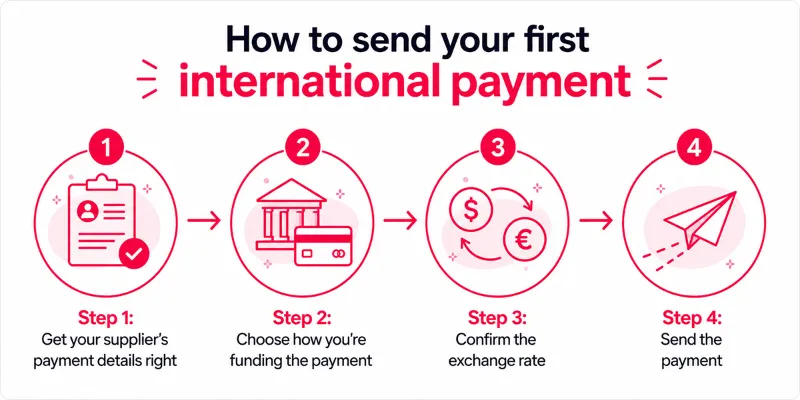
How to send your first international payment: step by step
For a first international payment, the priority is to verify the supplier’s payment details before sending funds to ensure the transfer reaches the correct account without avoidable delays.
Step 1: Get your supplier’s payment details right
Ask your supplier to confirm:
- Full beneficiary name exactly as it appears on their bank account
- Bank name and branch
- Account number or IBAN (Europe/UK)
- SWIFT/BIC code (for TT/SWIFT payments)
- Currency they want to be paid in (for example USD, EUR, CNH)
- Payment reference they’d like you to use (invoice number or order ID)
Keep your own SSM registration and tax details organised, because some providers and banks may ask for them when you set up a new overseas beneficiary.
Review the invoice and the supplier’s bank details side by side to confirm that all names, currencies and amounts are aligned. Even a minor mismatch can be sufficient for compliance teams to place the payment on hold.
If anything looks unclear, ask the supplier to resend a clean, complete set of details.
Step 2: Choose the payment route and funding source
Next, determine which payment route you will use to send the international payments. Your choice is one of the factors that determines both your total costs and the speed at which your invoice clears.
Funding from a bank balance tends to offer lower overall costs and standard processing times. Card‑funded payments clear faster, but they attract higher cross‑border and FX‑related charges that become more significant as transaction values increase.
Sign in to your chosen banking or payment platform and complete the payment workflow step by step. Select the correct destination country, currency and payment type, and add the supplier as a stored beneficiary so future transfers can be initiated with consistent details and fewer manual inputs.
Step 3: Confirm the exchange rate before you send
Before you click ‘confirm’, pause to check the exchange rate and the total in MYR, as this is the point where many new importers end up paying more than they intended without realising it.
Review three things:
- The FX rate: is it shown clearly, and is it close to the mid‑market rate you can see on public rate sites?
- The fees: are transfer fees, platform fees or bank charges listed separately, or bundled into the rate?
- For the landed amount: does the ‘amount the supplier receives’ match the invoice total in their currency?
If you’re using a multi‑currency account, you might have the option to:
- Convert MYR into the supplier’s currency at the point you authorise the payment, using the live rate shown on your banking or payment platform
- Hold the foreign currency balance and pay from it, instead of converting each time
Using a pre‑funded foreign‑currency balance that you converted earlier provides greater predictability over the final amount delivered to the supplier and reduces exposure to real-time exchange‑rate movements.
Step 4: Confirm, send and track the payment
The payment mechanics differ by method, but the reassurance points are similar.
After you click ‘confirm’, you should see:
- A payment confirmation screen or receipt with a reference number
- The estimated delivery time (for example, same day, 1–2 business days, or 3–5 business days for some TTs)
- The exact amount that will leave your account and the amount your supplier is expected to receive
For your supplier, you should do the following:
- Forward the payment confirmation or PDF receipt, with the date, amount, and reference
- Restate the invoice number or order ID in your email so they can match the payment to the shipment
How to send an international payment from Malaysia with WorldFirst
To pay an overseas supplier with WorldFirst:
- Go to Payments > Send & withdraw
- Select an existing verified payee or add your supplier
- Choose the payment currency and enter the amount
- Add the invoice reference or payment-purpose information where requested
- Choose to pay now or schedule the payment for later
- Review the exchange rate, payment fee, expected delivery and beneficiary details
- Complete the security verification and confirm the payment
Automatic transfers are available separately for recurring fixed payments or balance-based payment rules.
Mistakes to avoid when making your first overseas payments
Even experienced importers run into avoidable problems when sending international payments from Malaysia.
Some of the most common issues to be aware of are:
- Using one route for every supplier: A route that works for one currency or destination may not fit another invoice
- Paying an account that can’t receive the invoice currency: The receiving bank may convert or reject the payment
- Sending a duplicate before tracing the first payment: Check the status and contact the provider before paying again
- Using an unlicensed payment operator: Confirm that the provider is authorised to offer the relevant service in Malaysia
Why WorldFirst makes your next overseas payment easier
For new importers, a first overseas payment usually means switching between a bank app and a card, each with different limits, fees and FX rates, and no single record of what you actually paid in ringgit once bank fees, card charges and markup are included.
Imagine your first order requires a RM3,500 payment for a supplier invoice of about US$850. If the selected payment method adds a total FX cost of 2% to 3%, the currency cost alone would equal around RM70 to RM105, and that is before any separate transfer, card or receiving-bank charges.
With a World Account, you can review the quoted exchange rate and payment fee before confirming the transfer. If the total margin is 1 to 1.5% lower than the alternative quote, the difference would equal around RM35 to RM52.50 on a RM3,500 payment.
You can also review the amount expected at the supplier’s account and the estimated payment arrival time before approval.
Sending one international payment is simple when the invoice and the order line up. As you add new orders and multiple suppliers, you need more control over your payment options.
You can open a local receiving account in 20+ currencies (including USD, EUR, GBP, CNH, JPY, AUD) from a single World Account. Receive funds as if they were local payments, pay in 100+ currencies to 200+ countries, and move balances between currency accounts with ease.
WorldFirst isn’t a bank. Ant International has received approval from Bank Negara Malaysia to operate WorldFirst in Malaysia under a Class A Money Services Business licence. WorldFirst provides cross-border payment and multi-currency account services for businesses.
Open a World Account for free and start making faster, easier global payments today.
FAQs
1. What documents may a provider request for a supplier payment?
A provider may request the invoice, purchase order, contract, payment-purpose information or shipment documents. The exact requirements depend on the payment value, currency, destination and regulatory checks.
2. Can you schedule or automate supplier payments?
Yes, depending on the provider. A scheduled payment is normally set for a future date, while an automatic rule can cover recurring fixed amounts or payments triggered by an account balance.
3. How long does an international supplier payment take?
Delivery depends on the currency, route, beneficiary bank and required checks. Review the expected delivery date before approval rather than assuming every payment will arrive instantly or on the same day.
Disclaimer:
This article is intended for general informational purposes only and does not constitute legal or professional advice. WorldFirst makes no representations or warranties regarding the accuracy, completeness, or applicability of the content, and readers are encouraged to consult with legal professionals or other professionals for advice tailored to their specific situation. WorldFirst does not guarantee the accuracy and completeness of this article and expressly disclaims any and all liability to any person in respect of the consequences of anything done or omitted to be done wholly or partly in reliance on this article.
Sources:
- https://www.researchgate.net/publication/387677692_The_Global_Real-Time_Payments_Landscape_Challenges_and_Innovations_in_Cross-Border_Instant_Payments
- https://www.fortunebusinessinsights.com/cross-border-payments-market-110223
- https://www.bnm.gov.my/-/money-services-business-act-2011
![TIN number (Tax Identification Number) in Malaysia [2026]: A guide](https://mdn.marmot-cloud.com/worldfirst/sites/10/2026/10/20261022193456868-300x206.webp)

![Public Bank USD account review [2026] Malaysia: Features, fees and more](https://mdn.marmot-cloud.com/worldfirst/sites/10/2026/10/20261021125931797-300x200.webp)
![CIMB USD account review [2026] Malaysia: Features, fees and more](https://mdn.marmot-cloud.com/worldfirst/sites/10/2026/10/20261021124553858-300x200.webp)
![Maybank USD account review [2026] Malaysia: Features, fees and more](https://mdn.marmot-cloud.com/worldfirst/sites/10/2026/10/20261021122232497-300x200.webp)