Learn how Shopee Malaysia sellers can set up a World Account and use it to receive multi currency payouts–with no fee for receiving funds
Key takeaways
- Malaysian sellers on Shopee Malaysia can withdraw payouts directly into a World Account by adding a MYR receiving account inside the World Account and linking it to the Shopee Seller Centre.
- The World Account is a multi-currency account, so the same account can hold MYR from Shopee sales alongside USD collected from international marketplaces or clients
- Funds in the account can be held, converted between supported currencies, used to pay overseas suppliers, or withdrawn to a local bank account.
For Malaysian sellers on Shopee, Shopee handles the checkout side of the business including the customer transaction, the buyer protection, the release of funds to the seller’s balance. But what happens next, though, is up to the seller. The payout has to land somewhere, and where it lands determines how quickly the funds are usable and how much of the sale value gets absorbed by receiving fees or unnecessary conversions along the way.
This guide walks through how to receive Shopee Malaysia payouts into a World Account, from setting up the receiving account through to linking it inside Shopee Seller Centre.
Why use a World Account for Shopee payouts
The World Account is a multi-currency account from WorldFirst, an international payments provider. Malaysian sellers can use it the World Account for both domestic and international operations
Domestic side: Payouts from Shopee Malaysia settle in MYR. The World Account gives sellers a MYR receiving account they can use as the Shopee payout destination, holding funds in MYR before moving them elsewhere
Cross-border side: For Malaysian sellers who also sell on international marketplaces such as Amazon US, cross-border Shopee stores, direct-to-consumer stores through Shopify or Stripe, the same World Account can also help you set up a virtual USD account to collect and hold USD funds from those international channels. Domestic Shopee sales in MYR and international sales in USD can sit in the same account, in the currencies they were earned in, without immediate forced conversion.
Sellers can also send payments from the account in USD, MYR or CNH, including direct payments to 1688.com suppliers through World Pay, the authorised international payment provider for 1688.com.
What you need before you start
Before starting the setup, sellers need:
- An active World Account; Registration is completed online through the WorldFirst website. Business or personal details, identity documents and any business registration documents are submitted at this stage. Verification typically takes a few business days.
- An active Shopee Malaysia seller account: The account should be verified and set up for receiving payouts.
- Access to the Shopee Seller Centre: Specifically, access to the Finance section, which is where bank account details are added and managed.
The Shopee mobile number used for the seller account will also be needed during verification, since Shopee sends a one-time password by SMS to confirm the bank account link.
Steps to receive money from Shopee Malaysia with a World Account
Step 1: Set up a receiving account in your World Account
The first step is opening the receiving account inside the World Account. This is where Shopee will send the payout.
- Log in to the World Account dashboard
- Go to the Collections tab, then click Manage accounts
- Click Add a new Receiving Account
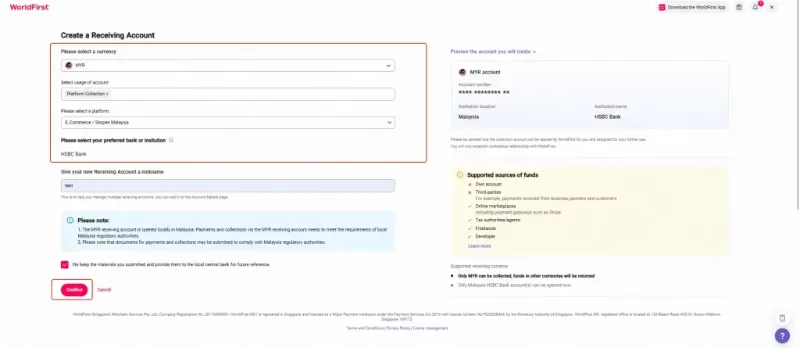
- Select the currency. For Shopee Malaysia payouts, choose MYR
- Fill in the details Shopee requires, including account usage, marketplace platform (Shopee), the supported bank, and a name for the account
- Click Confirm to create the account
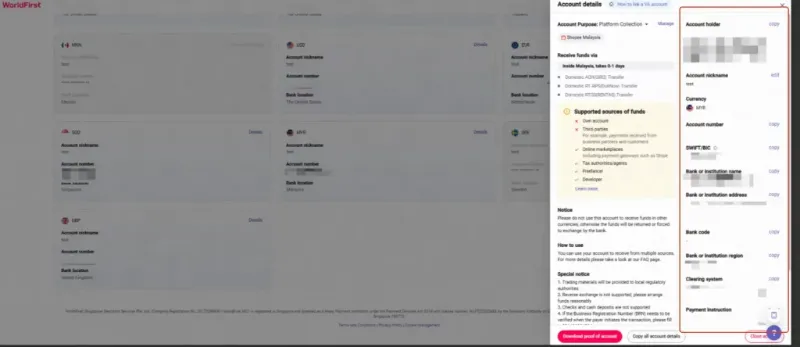
- Once the account is active, click Details to view the account information you’ll need in the next step, including the account holder name and account number
Step 2: Link your receiving account inside Shopee Seller Centre
With the World Account receiving account set up, the next step is adding it to Shopee as a payout destination.
- Log in to the Shopee Malaysia Seller Centre
- Go to Finance → My Balance → Payment Services.
- Click Add Bank Account.
- Enter the World Account receiving account details from Step 1. The two critical fields are:
- Full Name in the Bank Account. This must match the account holder name shown in the World Account receiving account
- Account No. This must match the account number shown in the World Account receiving account
- Tick Set as default bank account if you want the World Account to be the default payout destination for Shopee
- Click Save
- Review the summary of the linked account details that Shopee displays, and confirm
- Verify the account using the one-time password sent to the mobile number registered on the Shopee account
Do more with your World Account
For sellers who are (or plan to be) active across more than one marketplace, the World Account works with 130+ global marketplaces and payment gateways. Adding another marketplace as a payout source uses the same pattern as the Shopee setup: create a receiving account in the matching supported currency, then add those account details to the marketplace’s payout settings.
For a Malaysian seller expanding internationally, this means the same World Account can handle domestic Shopee Malaysia payouts in MYR and international USD payouts from US-facing marketplaces, all inside a single dashboard.
This article is intended for informational purposes only and does not constitute legal advice or professional advice. This article should not be regarded as constituting an offer or a solicitation to buy or sell any regulated or financial products or services. WorldFirst makes no representations or warranties regarding the accuracy, completeness, or applicability of the content, and readers are encouraged to consult with legal professionals or other professionals for advice tailored to their specific situation. WorldFirst does not guarantee the accuracy and completeness of this article and expressly disclaims any and all liability to any person in respect of the consequences of anything done or omitted to be done wholly or partly in reliance on this article.