Freelancers in Malaysia can use the World Account to collect Upwork earnings in USD and hold the funds without automatic conversions–with zero receiving fees
Key takeaways
- Upwork pays freelancers in USD. So when a freelancer wants to withdraw funds to a local currency account other than USD, there is a possibility to lose profits due to automatic conversions
- The World Account lets freelancers in Malaysia open a USD receiving account with local US bank details and collect USD funds directly into the account
- USD funds can be held, converted between USD and MYR when the timing suits, or used to pay overseas expenses in a supported currency
Upwork Malaysia pays every freelancer in USD, regardless of where the freelancer is based. For a Malaysian freelancer, that USD payout has to land somewhere, and most of the standard options add cost.
Sending USD into a Malaysian bank account typically means the bank converts to MYR on arrival at its own exchange rate. You can be charged a receiving fee by the bank and Upwork also deducts a withdrawal fee.
The World Account allows freelancers to set up a USD receiving account with local US bank details, so Upwork can pay you like a local. This guide walks through the setup, from opening the receiving account to linking it inside Upwork.
What to have ready before you start
Before starting the setup, you’ll need:
- An active World Account: Registration is completed online through the WorldFirst website. Business or personal details, identity documents and any registration documents are submitted at this stage. Verification typically takes a few business days
- A verified Upwork freelancer account: Your tax information should already be entered on Upwork, since Upwork requires this before any withdrawal method can be added
- Your Upwork verified name on hand: The name on your Upwork account must match the account holder name on your World Account receiving account. Even small differences can cause the withdrawal method to be flagged for a name mismatch
Steps to get paid on Upwork Malaysia with a World Account
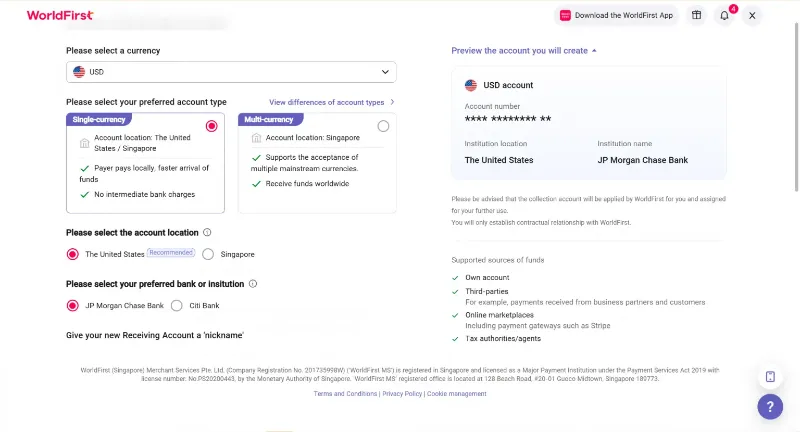
Step 1: Set up a USD receiving account in your World Account
Inside the World Account dashboard, the receiving account is where Upwork will send earnings.
- Log in to the World Account dashboard
- Go to the Collections tab, then click Manage Accounts
- Click Add a New Receiving Account
- Select USD as the currency
- Fill in the required details, including account usage and marketplace platform
- Confirm to create the account
- Once the account is active, click Details to view the account information you’ll need in the next step
Step 2: Add the World Account as a withdrawal method on Upwork
With the USD receiving account created, the next step is adding it to Upwork
- Sign in to Upwork and go to Settings
- Select Get Paid, then click Add a Method
- Click Set up next to Direct to U.S. Bank (USD)
- Choose a withdrawal schedule (manual or automatic on a set cycle), then click Next
- Enter the receiving account details from Step 1, making sure that:
- The Routing Number field is populated with the ACH routing number from the World Account
- The name on the World Account matches the verified name on your Upwork profile.
- Confirm the details and save
For security, Upwork typically activates new withdrawal methods after three calendar days. Upwork may also send one or two small microdeposits to the World Account USD balance to verify ownership. Microdeposits usually arrive within one to three days. Once they land, confirm the amounts back inside Upwork to complete verification.
This article is intended for informational purposes only and does not constitute legal advice or professional advice. This article should not be regarded as constituting an offer or a solicitation to buy or sell any regulated or financial products or services. WorldFirst makes no representations or warranties regarding the accuracy, completeness, or applicability of the content, and readers are encouraged to consult with legal professionals or other professionals for advice tailored to their specific situation. WorldFirst does not guarantee the accuracy and completeness of this article and expressly disclaims any and all liability to any person in respect of the consequences of anything done or omitted to be done wholly or partly in reliance on this article.