Take a look at how Fiverr freelancers in Malaysia can receive USD earnings into the World Account
Key takeaways
- Fiverr typically pays freelancers in USD and how those earnings are withdrawn determines how much of the value actually reaches the freelancer’s bank account
- Available withdrawal methods on Fiverr include PayPal, bank transfer, and the Fiverr Revenue Card. Each has different fees and processing times
- Freelancers can route their Fiverr earnings into a World Account by setting up a USD receiving account
- Once the earnings are in the World Account, freelancers can hold USD, convert into MYR when the rate suits, or use the balance to pay overseas expenses in a supported currency.
Fiverr pays freelancers in USD and when that USD is withdrawn to a Malaysian bank account, the bank converts it into MYR at its own exchange rate and may charge a receiving fee. By using a USD account, Malaysian freelancers can receive and hold USD funds without immediate conversion into MYR, giving them control over when the funds are converted and at what rate.
This guide covers Fiverr’s withdrawal options, how to set up a World Account for USD earnings, and the steps for linking it as a payout method.
How Fiverr earnings become available
Before setting up a withdrawal method, it helps to know what’s actually withdrawable and when
- Earnings vs Fiverr Balance: Only earnings from completed orders can be withdrawn. Balances from order cancellations or refunds on purchases you made as a client cannot be withdrawn. It can only be refunded to the original payment method or used to place new orders
- Withdrawal limits: Withdrawals are capped at US$5,000 per transaction
- Waiting periods: Fiverr enforces a 24-hour wait after your first withdrawal, a 24-hour wait after adding or changing a withdrawal method, and a 48-hour wait after updating your verified phone number
- Age requirement: You need to be at least 18 to withdraw earnings directly. Freelancers between 13 and 17 use an account owned by a parent or guardian.
What withdrawal methods does Fiverr support
Fiverr freelancers currently have four main payout options:
- PayPal: Fast to set up, widely available, but comes with PayPal’s own fee structure and currency conversion charges
- Bank transfer: Sends funds to a bank account
- Fiverr Revenue Card: A prepaid card for spending earnings directly
Each method has different fees, processing times and country restrictions, so it’s worth checking Fiverr’s current fee schedule and comparing against your own bank or provider’s incoming payment fees before choosing.
Steps to get paid on Fiverr with a World Account
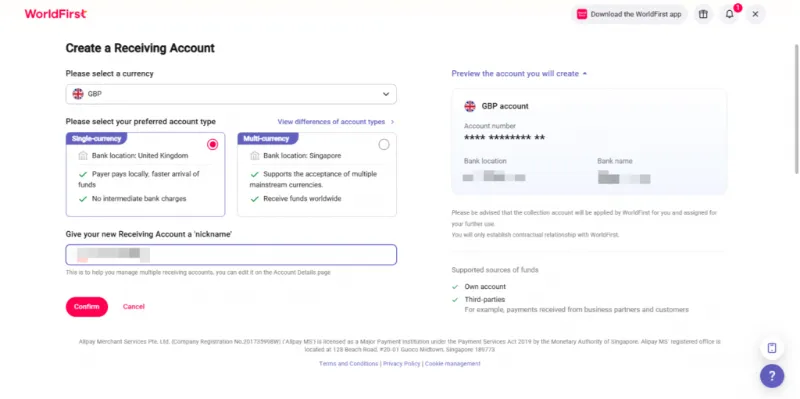
Step 1: Set up a USD receiving account in your World Account
Inside the World Account dashboard, create the receiving account that will hold your Fiverr earnings.
- Log in to the World Account dashboard
- Go to the Collection tab, then click Manage Accounts
- Click Add a New Receiving Account
- Select USD as the currency
- Fill in the required details, including account usage
- Confirm to create the account
- Once the account is active, click Details to view the account information
The details you’ll need for the next step include the account number and any routing information tied to the USD receiving account.
Step 2: Add the withdrawal method inside Fiverr
The route into a World Account runs through the bank transfer option.
- Sign in to Fiverr and go to My business → Earnings
- Click Manage payout methods (or Withdraw balance if you have funds available to withdraw immediately)
- Select Bank transfer as the payout method
- Follow the prompts to link a bank account, entering the World Account USD receiving account details from Step 1
- Complete the setup and verification steps required
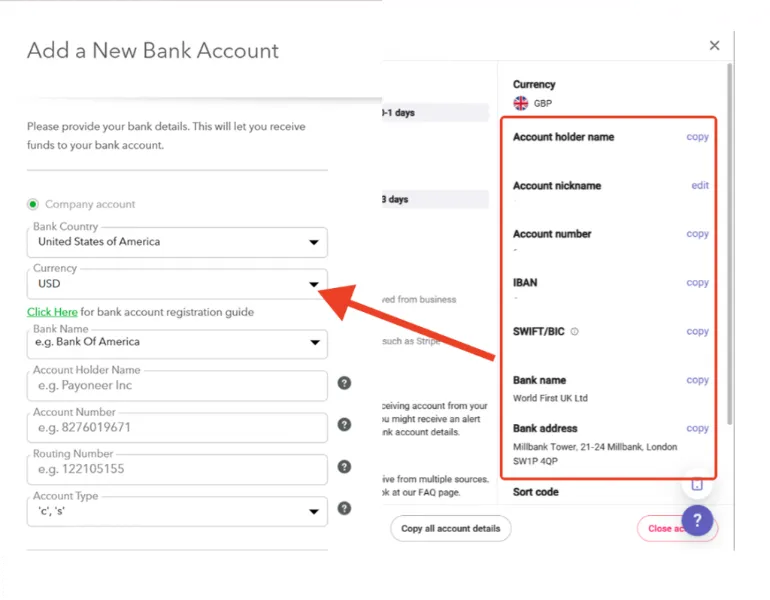
The name on the World Account receiving account must match the verified name on your Fiverr account. Mismatches can hold up withdrawals or cause the method to be rejected.
Note the 24-hour waiting period after adding a new withdrawal method before it can actually be used.
Step 3: Withdraw and monitor
Once the withdrawal method is set up and active, withdrawals happen through the Earnings page in My business.
- Go to My business → Earnings
- In the Available Funds section, click Withdraw balance
- Select the bank transfer method you added, and set the withdrawal amount (partial withdrawals are supported)
- Confirm the payout method and amount
- Enter the verification code sent to your registered phone number to complete the withdrawal
Do more with your World Account
Freelancers who work across multiple marketplaces or take direct client work often find they’re managing several USD payment sources at once. Fiverr, Upwork, direct invoices to overseas clients, marketplace payouts from other platforms.
The World Account handles multiple inflows through the same USD receiving account. Payments in USD, MYR or CNH can also be sent from the account to cover overseas SaaS subscriptions, contractors and supplier bills. For freelancers occasionally sourcing physical products from Chinese suppliers, World Pay, the authorised international payment provider for 1688.com, is available for direct payments to 1688.com suppliers.
This article is intended for informational purposes only and does not constitute legal advice or professional advice. This article should not be regarded as constituting an offer or a solicitation to buy or sell any regulated or financial products or services. WorldFirst makes no representations or warranties regarding the accuracy, completeness, or applicability of the content, and readers are encouraged to consult with legal professionals or other professionals for advice tailored to their specific situation. WorldFirst does not guarantee the accuracy and completeness of this article and expressly disclaims any and all liability to any person in respect of the consequences of anything done or omitted to be done wholly or partly in reliance on this article.